+ Reply to Thread
Page 2 of 2 FirstFirst 12
Results 11 to 11 of 11
Like Tree1Likes

Thread: Resizing an Image in CS5 (Without using Image Resize)

  1. #11
    Newbie
    Join Date
    Sep 2011
    Posts
    1
    Thanks
    0
    Thanked 0 Times in 0 Posts

    Re: Resizing an Image in CS5 (Without using Image Resize)

    Howdy.

    In CS3 I could use the Move Tool and a Black Box with 8 little black boxes around the image would appear and I could resize the picture with them.

    How do I re-enable that feature in CS5?
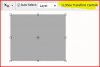
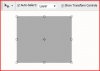
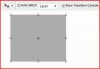
    In the Move Tool Options bar, enable "Show Transform Controls".

    You will get 8 drag points around the perimeter and a movable rotate point in the middle.

    With this option selected, whenever you are using the Move Tool, the Transform command is automatically invoked if you drag a handle, move the rotation point, or rotate with your mouse.

    Resizing an Image in CS5 (Without using Image Resize)-transform-2.jpg


    It's the same in Cs3 and Cs5.

    FWIW.

    Peace,
    Lee
    Attached Thumbnails Attached Thumbnails Resizing an Image in CS5 (Without using Image Resize)-transform.jpg  

    Resizing an Image in CS5 (Without using Image Resize)-transform-1.jpg  


Tags for this Thread

Posting Permissions

  • You may not post new threads
  • You may not post replies
  • You may not post attachments
  • You may not edit your posts
Powered by vBulletin® Version 4.1.9
Copyright © 2012 vBulletin Solutions, Inc. All rights reserved.
Content Relevant URLs by vBSEO 3.6.0
Copyright 2011 Photoshop Gurus Forum. All rights reserved.
All times are GMT -5. The time now is 01:19 PM.
vBulletin Skins