
3Likes
-
Photo not showing up on the document window
Real newbie
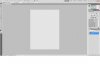
....I right click on the photo and open with PS CS5. I've also tried opening the program and opening the photo from there. I can't get a photo to show up on the document window, just the white/grey checker board. I see the photo on the vertical dock on the right hand side. So I really am stuck at the get go. Ive printed the manual and I have watched some tutorials, just havent found one that helps me with this problem.
BayCat
-
-
Guru
Re: Photo not showing up on the document window
check your opacity levels only thing I can think of
-
-
Power User
Re: Photo not showing up on the document window
Also check the size. I thought something wasn't showing up recently and found out it was too small to show on the checkerboard. Trying clicking on the move tool so that the little bounding boxes show.
-
-
Guru
Re: Photo not showing up on the document window
Or just post file here. If we'll open it normaly then it's PS fault. In that case make screenshot bigger. Can't see color mode or percentage (don't know yet how it could help but still).
Rather than love, than money, than fame, give me truth. © Henry David Thoreau
-
-
Re: Photo not showing up on the document window
Will try those suggestions when I get home tonight. If they dont work I'll post the pix and a larger size of the screen shot. Thanks everyone for your prompt replies and not making me feel like a idiot (more than I already do)!
BayCat
-
-
Guru
Re: Photo not showing up on the document window
We all have been there in one way or another, no need to feel idiotic .... good luck
-
-
Guru
Re: Photo not showing up on the document window

Originally Posted by
BayCat
Thanks everyone for your prompt replies and not making me feel like a idiot (more than I already do)!
I know what you talking about.
I'm still amazed how polite and mature everybody are here.
That makes me raise myself up.

Originally Posted by
iDad
We all have been there in one way or another, no need to feel idiotic .... good luck
I'm totaly still there.
Rather than love, than money, than fame, give me truth. © Henry David Thoreau
-
-
Forum Mod
Re: Photo not showing up on the document window
I zoomed on screen shot to 300% but it breaks down too much. Doesn't look like opacity 0% but doesn't look like 100% either. BayCat will get back to us I'm sure.
-
-
Guru
Re: Photo not showing up on the document window
If nothing else works then shut down Photoshop. Restart PS and while doing this press down 3 keys: Shift+Ctrl+Alt
This will reset Photoshop back to factory default. Now is should work.
-
-
Administrator
Re: Photo not showing up on the document window
Two easy things to try:
Disable OpenGL Drawing
Use Ctrl+K, Cmd+K on the Mac to open Preferences.
Go to Performance and "Uncheck" Enable OpenGL Drawing
Close then restart Photoshop.
If that doesn't help, reset the Preferences file.
Start Photoshop and immediately hold down Ctrl+Alt+Shift (Windows)
or Command+Option+Shift (Mac OS X).
Then, click Yes to the message, "Delete the Adobe Photoshop Settings file?"
Fenix already mentioned the reset.
-
Tags for this Thread
Posting Permissions
- You may not post new threads
- You may not post replies
- You may not post attachments
- You may not edit your posts
Forum Rules
Powered by
vBulletin® Version 4.1.9
Copyright © 2012 vBulletin Solutions, Inc. All rights reserved.
Content Relevant URLs by
vBSEO 3.6.0
Copyright 2011 Photoshop Gurus Forum. All rights reserved.