+ Reply to Thread
Results 1 to 7 of 7
Like Tree1Likes
  • 1 Post By hawkeye

Thread: please hurry. help me am stuck.

  1. #1
    Member
    Join Date
    Sep 2011
    Posts
    31
    Thanks
    22
    Thanked 0 Times in 0 Posts

    please hurry. help me am stuck.

    guys
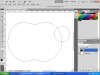
    i just draw apple using pen tool and want to cut.in this image below. circle drawn on eclips tool. i try to cut the circle area. but i cant found any thing for erase. earaser tool also not working.

    What should i do to cut the Apple.(circle)?
    please hurry. help me am stuck.-asd.png

  2. #2
    Member
    Join Date
    Sep 2011
    Posts
    31
    Thanks
    22
    Thanked 0 Times in 0 Posts

    Re: please hurry. help me am stuck.

    oh for more info. i follow this tutorial and stuck on step 1. :P because this is my first tutorial in photo shop. Design an awesome wallpaper for Mac OS X

  3. #3
    Guru
    Join Date
    Apr 2011
    Location
    born in U.S.S.R.
    Posts
    1,742
    Thanks
    36
    Thanked 120 Times in 112 Posts

    Re: please hurry. help me am stuck.

    Stucked in vector mask. read $1r_M4x1mu$ post and follow it.
    Rather than love, than money, than fame, give me truth. © Henry David Thoreau

  4. #4
    Guru
    Join Date
    Mar 2010
    Location
    Mesa, Arizona
    Posts
    1,108
    Thanks
    0
    Thanked 71 Times in 70 Posts

    Re: please hurry. help me am stuck.

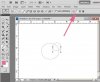
    Select the small circle path, click the subtract from path icon at the top.
    Attached Thumbnails Attached Thumbnails please hurry. help me am stuck.-screenshot001.jpg  

    ibclare likes this.

  5. #5
    Member
    Join Date
    Sep 2011
    Posts
    31
    Thanks
    22
    Thanked 0 Times in 0 Posts

    Re: please hurry. help me am stuck.

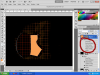
    ok guys here is a situation. when i create a layer with some blending options, the same blending options apply on new layer.

    For example if i create a circle and apply some blending options and then in new layer i create a rectangle shape the same blending options apply on rectangle shape and so on applying same options on other layer that i may create.

    is there any way to stop this? i mean if i apply some blending option on 1 layer and create other layer with different shape then there must be no any blending option and default foreground color should be applied.

    please hurry. help me am stuck.-asda.png

  6. #6
    Guru
    Join Date
    Jul 2011
    Location
    on a computer... duuh
    Posts
    1,331
    Thanks
    90
    Thanked 40 Times in 38 Posts

    Re: please hurry. help me am stuck.

    if i am following if you right click one of them and click clear layer style, it should go away.

  7. #7
    Member
    Join Date
    Sep 2011
    Posts
    31
    Thanks
    22
    Thanked 0 Times in 0 Posts

    Re: please hurry. help me am stuck.

    ok thanxs. it just clear those styles from only one layer. i want more then it. i mean when blending options created then it must be stoped on the selected layer on which the options created. not on any other layer after i create the blended layer.
    hope you might understand what i want to say.


Tags for this Thread

Posting Permissions

  • You may not post new threads
  • You may not post replies
  • You may not post attachments
  • You may not edit your posts
Powered by vBulletin® Version 4.1.9
Copyright © 2012 vBulletin Solutions, Inc. All rights reserved.
Content Relevant URLs by vBSEO 3.6.0
Copyright 2011 Photoshop Gurus Forum. All rights reserved.
All times are GMT -5. The time now is 01:20 PM.
vBulletin Skins