+ Reply to Thread
Page 1 of 2 12 LastLast
Results 1 to 10 of 16
Like Tree2Likes

Thread: Pixelation of shape layers

  1. #1
    Junior Member
    Join Date
    Oct 2011
    Posts
    7
    Thanks
    0
    Thanked 0 Times in 0 Posts

    Pixelation of shape layers

    Hi Gurus,

    I'm just getting started with PhotoShop and I've noticed that when I create custom shape layers, the fill is often noticeably pixelated. I know that PhotoShop is generally a raster based tool, but my understanding is that the shape layers are created as vector graphics. I don't see the same pixelation in the tutorial I'm following, so I'm wondering if there is a setting that I could adjust to get rid of the jagged edges.

    My canvas is set at 5 x 7 in. so I don't think I'm zooming in too much.

    Thanks for any help.

    Doug

  2. #2
    Senior Member
    Join Date
    Oct 2011
    Location
    UK
    Posts
    105
    Thanks
    1
    Thanked 7 Times in 7 Posts

    Re: Pixelation of shape layers

    Make sure you have anti-alias turned on (the tick box next to opacity on the top tool bar when you have the shape tool selected).

  3. #3
    Junior Member
    Join Date
    Oct 2011
    Posts
    7
    Thanks
    0
    Thanked 0 Times in 0 Posts

    Re: Pixelation of shape layers

    Thanks for the quick response! That sounds like a reasonable solution, but in shape mode I don't see the anti-alias or opacity functions on my toolbar. Do I need to manually add those in preferences (or somewhere)?

  4. #4
    Guru
    Join Date
    Apr 2011
    Location
    born in U.S.S.R.
    Posts
    1,742
    Thanks
    36
    Thanked 120 Times in 112 Posts

    Re: Pixelation of shape layers

    Post example (psd file with shape) of that couse it shoudn't be so.
    Rather than love, than money, than fame, give me truth. © Henry David Thoreau

  5. #5
    Senior Member
    Join Date
    Oct 2011
    Location
    UK
    Posts
    105
    Thanks
    1
    Thanked 7 Times in 7 Posts

    Re: Pixelation of shape layers

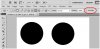
    Pixelation of shape layers-untitled-1.jpg

    That's where it is on mine. I'm using CS5 so it might be in a different place if you're using a different version. Also the left circle was made with aniti-alias turn on and the right with it turned off, I'm guessing yours looks like the one on the right?
    BrennanH likes this.

  6. The Following User Says Thank You to Boomawoom For This Useful Post:

    BrennanH (10-06-2011)

  7. #6
    Junior Member
    Join Date
    Oct 2011
    Posts
    7
    Thanks
    0
    Thanked 0 Times in 0 Posts

    Re: Pixelation of shape layers

    My tool bar is missing that stuff. I have a picture file of my screen, but can't figure out how to post to here. How did you add the image above?

  8. #7
    Senior Member
    Join Date
    Oct 2011
    Location
    UK
    Posts
    105
    Thanks
    1
    Thanked 7 Times in 7 Posts

    Re: Pixelation of shape layers

    Click on "go advance" next to "submit reply" (or something like that) then click the paper clip thing to add an attachment, upload it, click on it so it's ticked, then click "insert inline" at the bottom right corner.

  9. #8
    Junior Member
    Join Date
    Oct 2011
    Posts
    7
    Thanks
    0
    Thanked 0 Times in 0 Posts

    Re: Pixelation of shape layers

    I'm attaching my screenshot.
    Attached Thumbnails Attached Thumbnails Pixelation of shape layers-picture-5.png  


  10. #9
    Senior Member
    Join Date
    Oct 2011
    Location
    UK
    Posts
    105
    Thanks
    1
    Thanked 7 Times in 7 Posts

    Re: Pixelation of shape layers

    Hmm, I'm not sure. Which version of Photoshop are you using? It might just be a different layout because you're on a mac and I'm on a PC but I thought it'd be the same.

  11. #10
    Senior Member
    Join Date
    Oct 2011
    Location
    UK
    Posts
    105
    Thanks
    1
    Thanked 7 Times in 7 Posts

    Re: Pixelation of shape layers

    Ah I think I know what it is; Change the style from 'shape layer' to 'fill pixels' which is at the top left of the tool bar, next to the pen tool.


Tags for this Thread

Posting Permissions

  • You may not post new threads
  • You may not post replies
  • You may not post attachments
  • You may not edit your posts
Powered by vBulletin® Version 4.1.9
Copyright © 2012 vBulletin Solutions, Inc. All rights reserved.
Content Relevant URLs by vBSEO 3.6.0
Copyright 2011 Photoshop Gurus Forum. All rights reserved.
All times are GMT -5. The time now is 01:24 PM.
vBulletin Skins