2Likes
color dynamics is disabled and locked
hello people!
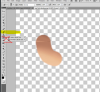
I use photoshop cs5 ( windows7) and I was working on an image well I dont know how but when I open again the file the brushes are weird and I cant use any color, the color dynamics icon is locked and I dont seem able to unlock it, its like it is disabled it only paints the background image not the colour I choose!
I have attached the files so u can see what I mean ! I hope u can help me !
Thanx in advance!
Power User
Re: color dynamics is disabled and locked
This is just a guess but are you sure that your not painting on a mask?
If you could post a screen shot it might be helpful so that we can see your layers pallett.
Re: color dynamics is disabled and locked
Hey thanx for quick response here is the screen shot, I hope it helps!
Attached Thumbnails
Silly Trucker
Re: color dynamics is disabled and locked
When you paint is it actually painting into another area of the screen, all manic and popping up anywhere any size?
This might not be related to your issue but it's a nice thing to have CLICK
Last edited by Paul; 11-27-2011 at 07:46 PM .
Forum Mod
Re: color dynamics is disabled and locked
You do not have the paint brush selected you have swapped the icon it is a channel mixer brush your using go up 2 icons
Forum Mod
Re: color dynamics is disabled and locked
sorry correction history brush my bad
Power User
Re: color dynamics is disabled and locked
Nice catch Hoogleman. That should remedy your issue Jeane.
Re: color dynamics is disabled and locked
thank u all!
Hoogleman thank you , but Im not sure I understand this right so you mean to select the history brush tool on the left toolbar? cause its selected Im posting a screenshot again.
Attached Thumbnails
Forum Mod
Re: color dynamics is disabled and locked
no go up 2 icons if you want the paint brush to paint whatever colour you want.
The Following User Says Thank You to Hoogle For This Useful Post:
Power User
Re: color dynamics is disabled and locked
If you want to paint you need the regular brush which is two up from there in the toolbar.
The Following User Says Thank You to Stric9 For This Useful Post:
Tags for this Thread
Posting Permissions
You may not post new threads
You may not post replies
You may not post attachments
You may not edit your posts
Forum Rules
Powered by
vBulletin® Version 4.1.9
Copyright © 2012 vBulletin Solutions, Inc. All rights reserved.
Content Relevant URLs by
vBSEO 3.6.0
Copyright 2011 Photoshop Gurus Forum. All rights reserved.