-
Need help isolating an image
Hi everyone,
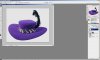
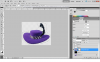
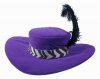
I'm trying to isolate an image from its background for a color manipulation. Trouble is, it's got this feather which is creating a lot of gaps of white. I'm trying to figure out what the fastest way to remove all the gaps would be. Can anyone help me out?
Image attached for reference.
-
-
Re: Need help isolating an image
with an image that has already been extracted and put over a white backdrop one thing you can do is to go to Select>Color Range> and then click in the white area of the original image, and hit ok. This will create a marquee selection of the white area in question, and then go to Select>Inverse. Now your hat is selected. My next step is to usually add a vector mask, and then I can go in and use a brush to fine tune any edges using black and white as fill colors in the vector mask to reveal or hide the image. This way I don't have to delete any image data.
-
-
Power User
Re: Need help isolating an image
Isolate the feather to its own layer with the lasso tool don't keep the feather with the hat.
Use the pen tool around the hat create a mask.
Create a new blank layer between the feather and the hat.
Make sure the feather is the top most layer use the blend if sliders under blending options to drop out the white. Otherwise you will lose the white in the band also.
Hide the background and merge the layers.
This should give you a good clean image with minimal trouble.
-
-
Power User
Re: Need help isolating an image
I did it to show you what the result can be. Use the blend if to taste. Less or more feather, what ever you like.

Took around 90 Seconds.
-
-
Re: Need help isolating an image
Thanks, Zach & Strychnine!
Now it looks like this:

Now my question is, is there any way I can get rid of the little bits of gray in between the feathers? What I want to do is turn the image into a silhouette so that I can make it into a screenprint.
-
Tags for this Thread
Posting Permissions
- You may not post new threads
- You may not post replies
- You may not post attachments
- You may not edit your posts
Forum Rules
Powered by
vBulletin® Version 4.1.9
Copyright © 2012 vBulletin Solutions, Inc. All rights reserved.
Content Relevant URLs by
vBSEO 3.6.0
Copyright 2011 Photoshop Gurus Forum. All rights reserved.