+ Reply to Thread
Results 1 to 3 of 3

Thread: Frame Scaling

  1. #1
    Newbie
    Join Date
    Dec 2011
    Posts
    2
    Thanks
    0
    Thanked 0 Times in 0 Posts

    Frame Scaling

    Hello,

    I'm not sure if this is possible in a relatively easy way. But, the gist of what I want to do is take an image with a frame (a border with a cut-out in the center) and reduce the area of the frame. Or scale the frame down and increase the center cut-out area.

    Here is an example of what I’m trying to accomplish (sorry I lack the posts count to post direct links so please add H T T P : / /):

    Starting Image:
    i686.photobucket.com/albums/vv228/Lamprey13/FrameSampleOriginal.png

    Scaled Image:
    i686.photobucket.com/albums/vv228/Lamprey13/FrameSampleScale.png

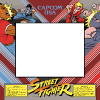
    Ultimately, I'd like to be able to increase the cut out area in images like this:
    i686.photobucket.com/albums/vv228/Lamprey13/streetfighter.png

    For refernce, I have access to Photoshop CS5. Any help would be apreciated!

    Cheers!

  2. #2
    Member
    Join Date
    Oct 2011
    Location
    Swansea, Wales
    Posts
    92
    Thanks
    4
    Thanked 9 Times in 9 Posts

    Re: Frame Scaling

    Hi Lamprey

    I have posted the images so others can see them a little easier but I have to admit I am not sure what it is you are trying to do? I'm probably being stupid but could you clarify a little more by any chance.

    webwize

    Frame Scaling-framesampleoriginal.pngFrame Scaling-framesamplescale.pngFrame Scaling-streetfighter.png

  3. #3
    Newbie
    Join Date
    Dec 2011
    Posts
    2
    Thanks
    0
    Thanked 0 Times in 0 Posts

    Re: Frame Scaling

    Webwize,

    Thanks for getting those images displayed.

    As for clarification, let me ramble a bit.. If you look at that 3rd image of the Street Fighter game bezel; what I want to do is increase the size of the “cut-out” area. But, I don’t want to crop the "frame" of the bezel. As you can see by my other sample images, the frame on the first one is wider/thicker than the one that is "scaled." So, I’ve increased the area inside the frame while decreasing the frame area. Yet, at the same time I have not changed the total area of the image nor has the frame been cropped.

    Back to the street fighter image, imagine if you printed that bezel out "life-size" and the center cut-out was wide enough to display a 19" monitor through it. But, you wanted to get a bigger monitor, say 25". You wanted to re-print the bezel, keeping it the size height and width, yet creating a larger hole for the larger monitor to fit through.

    I’m not sure if that makes any sense, or not. I might be too close to see the forest to for the trees.

    Thanks for trying to understand.


Tags for this Thread

Posting Permissions

  • You may not post new threads
  • You may not post replies
  • You may not post attachments
  • You may not edit your posts
Powered by vBulletin® Version 4.1.9
Copyright © 2012 vBulletin Solutions, Inc. All rights reserved.
Content Relevant URLs by vBSEO 3.6.0
Copyright 2011 Photoshop Gurus Forum. All rights reserved.
All times are GMT -5. The time now is 01:39 PM.
vBulletin Skins