
I'm trying to make a black rectangle with a hole in it. I've got the transparent background and the rectangle, but for the life of me can't figure out how to punch a hole in it. It feels like it should be really simple and I bet it is. Help would be greatly appreciated.
Photoshop Gurus Forum
Welcome to Photoshop Gurus forum. Register a free account today to become a member! It's completely free. Once signed in, you'll enjoy an ad-free experience and be able to participate on this site by adding your own topics and posts, as well as connect with other members through your own private inbox!

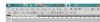
 The above is for Photoshop CS5 if you have another version that option will still be available but might be in a slightly different position.
