Hi,
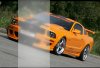
I'm pretty new to Photoshop (just bought CS5 a few months ago) and I'm trying to achieve the effect shown in the url referenced below. (I'm referring to the semi-transparent vertical bars that move back and forth over the photos.) I can't seem to get the "frosted/blurred look". I've tried blurring a semi-transparent rectangle as well as using Filter | Distort | Glass | Frosted ..., but I can't seem to get the same effect.
Anyone have any ideas?
Thanks for any suggestions I could try.
ginger
p.s. I just found I can't post a url since I'm new, so if anyone wants to take the time to look, it's the designsforliving dot com home page.
I'm pretty new to Photoshop (just bought CS5 a few months ago) and I'm trying to achieve the effect shown in the url referenced below. (I'm referring to the semi-transparent vertical bars that move back and forth over the photos.) I can't seem to get the "frosted/blurred look". I've tried blurring a semi-transparent rectangle as well as using Filter | Distort | Glass | Frosted ..., but I can't seem to get the same effect.
Anyone have any ideas?
Thanks for any suggestions I could try.
ginger
p.s. I just found I can't post a url since I'm new, so if anyone wants to take the time to look, it's the designsforliving dot com home page.