+ Reply to Thread
Results 1 to 6 of 6
  1. #1
    Power User
    Join Date
    Feb 2011
    Posts
    249
    Thanks
    1
    Thanked 1 Time in 1 Post

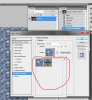
    Where and how can i get more "Patterns"?

    Like this ones:

    Where and how can i get more "Patterns"?-22.jpg

    I found a few but the installation just didn't succeed good.. and i need more..

  2. #2
    Forum Mod
    Join Date
    Mar 2002
    Location
    Here... ?
    Posts
    5,001
    Thanks
    10
    Thanked 191 Times in 189 Posts

    Re: Where and how can i get more "Patterns"?

    I have'nt done that for some time but you can create those with any texture image you have.

  3. #3
    Guru
    Join Date
    Jul 2009
    Location
    right in front of you
    Posts
    5,906
    Thanks
    23
    Thanked 147 Times in 144 Posts

    Re: Where and how can i get more "Patterns"?


  4. #4
    Forum Mod
    Join Date
    Mar 2002
    Location
    Here... ?
    Posts
    5,001
    Thanks
    10
    Thanked 191 Times in 189 Posts

    Re: Where and how can i get more "Patterns"?

    Here's what I mean .....

    Where and how can i get more "Patterns"?-pattern-overlay.jpg The pattern I used was a red field of Star Trek Logos.

    When you've chosen the right pattern you want, click the icon next to the pattern window to create new preset from chosen pattern....

  5. #5
    Member
    Join Date
    Dec 2011
    Posts
    72
    Thanks
    1
    Thanked 6 Times in 6 Posts

    Re: Where and how can i get more "Patterns"?

    You can download new patterns or create your own by selecting an area with the rectangular marquee tool and selecting in the menu Edit / Define Pattern...

  6. #6
    Power User
    Join Date
    Mar 2011
    Location
    Kentucky
    Posts
    230
    Thanks
    5
    Thanked 7 Times in 7 Posts

    Re: Where and how can i get more "Patterns"?

    Yeah, you can download new patterns just google them. Also, you download a .pat file and place it in the >Adobe>Photoshop>Plugins>Patterns folder. After that restart your photoshop, and go to the pattern interface you have opened in the image above. click on the arrow there, and it will say load patterns. Load the new patterns you download.


Tags for this Thread

Posting Permissions

  • You may not post new threads
  • You may not post replies
  • You may not post attachments
  • You may not edit your posts
Powered by vBulletin® Version 4.1.9
Copyright © 2012 vBulletin Solutions, Inc. All rights reserved.
Content Relevant URLs by vBSEO 3.6.0
Copyright 2011 Photoshop Gurus Forum. All rights reserved.
All times are GMT -5. The time now is 02:00 PM.
vBulletin Skins