Hello,
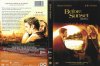
I'm pulling what little hair I have left out, trying to edit text on a .jpg.
I'm doing this for a friends birthday, thought it would be just a quick little thing that (unfortunately) I have spent countless hours/days over.
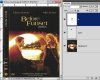
I know it's cheeky to ask, but i've attached the image in question.
Basically i'm trying to change Before Sunset, to Before Funset on the front and spine.
(yes I know exactly how cheeky and inane that sounds, but it's for a friends birthday and it will make them laugh - lots)
If anyone could tell me how to edit the text in the attachment from Before Sunset to Before Funset without it looking too shabby, I would be very greatful - cross internet screen hugs and all that.
Thanks
Jonstar
I'm pulling what little hair I have left out, trying to edit text on a .jpg.
I'm doing this for a friends birthday, thought it would be just a quick little thing that (unfortunately) I have spent countless hours/days over.
I know it's cheeky to ask, but i've attached the image in question.
Basically i'm trying to change Before Sunset, to Before Funset on the front and spine.
(yes I know exactly how cheeky and inane that sounds, but it's for a friends birthday and it will make them laugh - lots)
If anyone could tell me how to edit the text in the attachment from Before Sunset to Before Funset without it looking too shabby, I would be very greatful - cross internet screen hugs and all that.
Thanks
Jonstar