
+ Reply to Thread
Results 1 to 5 of 5
  1. #1
    Newbie
    Join Date
    Jan 2012
    Posts
    2
    Thanks
    1
    Thanked 0 Times in 0 Posts

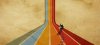
    Simple colour bars perspective

    Hi all,

    So the link to the tutorial on how to do this seems to be broken, but I don't figure it can be that hard.. has anyone got any pointers at all on how to accomplish? Would be a great help Simple colour bars perspective-po11.jpg
  2. #2
    Forum Mod
    Join Date
    Mar 2002
    Location
    Here... ?
    Posts
    5,003
    Thanks
    10
    Thanked 191 Times in 189 Posts

    Re: Simple colour bars perspective

    Hello, owlingSounds...

    That one's easy... As my capture shows prepare the color columns and group the layers. Make a copy of the grouped layers for use later and hide the copies.

    Simple colour bars perspective-1.jpg

  3. The Following User Says Thank You to dv8_fx For This Useful Post:

    owlingSounds (01-19-2012)

  4. #3
    Forum Mod
    Join Date
    Mar 2002
    Location
    Here... ?
    Posts
    5,003
    Thanks
    10
    Thanked 191 Times in 189 Posts

    Re: Simple colour bars perspective

    In Menu>EDIT>TRANSFORM>PRESPECTIVE...... click on on of the corner handles and drag it to the centre of the image to create a cone....

    Simple colour bars perspective-2.jpg

    Press CTRL+T to trasform the cone as shown below....

    Simple colour bars perspective-3.jpg

    You're almost there....
    Attached Thumbnails Attached Thumbnails Simple colour bars perspective-3.jpg  


  5. #4
    Forum Mod
    Join Date
    Mar 2002
    Location
    Here... ?
    Posts
    5,003
    Thanks
    10
    Thanked 191 Times in 189 Posts

    Re: Simple colour bars perspective

    Create a selection on the top half of the cone where you want the vertical colmns to meet. and hit delete. You would have something like this...

    Simple colour bars perspective-3.jpg


    Unhide the grouped layer copies made earlier. CTRL+T and transform the layers and align them to a point in the first group where you want to create the GOING UP part... lol...

    Simple colour bars perspective-4.jpg

  6. #5
    Forum Mod
    Join Date
    Mar 2002
    Location
    Here... ?
    Posts
    5,003
    Thanks
    10
    Thanked 191 Times in 189 Posts

    Re: Simple colour bars perspective

    There's your basic for the line perspective....

    To create the curve parts you'll need the elliptical selection tool and eraser tool to create the curves.

    You may need to ungroup the second set in order to align the vertical columns to it's repective "mate".

    Hope this helps start you off on your project...

    Cheers...


Tags for this Thread

Posting Permissions

  • You may not post new threads
  • You may not post replies
  • You may not post attachments
  • You may not edit your posts
Powered by vBulletin® Version 4.1.9
Copyright © 2012 vBulletin Solutions, Inc. All rights reserved.
Content Relevant URLs by vBSEO 3.6.0
Copyright 2011 Photoshop Gurus Forum. All rights reserved.
All times are GMT -5. The time now is 02:56 PM.
vBulletin Skins