Hi all,
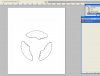
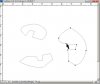
I struggled to get some shapes together by copying/pasting the paths and combining them. So for example I now have 3 circles which form a single vector shape.
Now I want to be able to colour each one of them individually. In the paths windows I have a single path with 3 circles and I just can't find a way to undo the combine operation and separate them.
I tried selecting one of them with ellipse tool w/ "substract from shape option" I didn't manage to isolate it properly.
Any ideas are welcome,
Thanks a lot
P.S. I'm on CS2
I struggled to get some shapes together by copying/pasting the paths and combining them. So for example I now have 3 circles which form a single vector shape.
Now I want to be able to colour each one of them individually. In the paths windows I have a single path with 3 circles and I just can't find a way to undo the combine operation and separate them.
I tried selecting one of them with ellipse tool w/ "substract from shape option" I didn't manage to isolate it properly.
Any ideas are welcome,
Thanks a lot
P.S. I'm on CS2