-
Can I please have help please I am Confused!!!!!
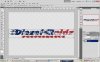
Okay so in cs5 how do I get the white to go away and make this logo so that I can stick on any color background and have the image size just the size of the actual image I am so confused please help!!!!!
Thanks
-
-
Re: Can I please have help please I am Confused!!!!!
This is what I see in cs5 I want the checker to be the same size as the actual image Please Help!!!!!!!!!1
-
-
Guru
Re: Can I please have help please I am Confused!!!!!
Use the crop tool to change the size of the canvas, and in the layers panel, click the icon to the left of the bin at the bottom. Now drag that layer underneath Layer 0, and paint whatever colour background you want.
-
-
Re: Can I please have help please I am Confused!!!!!

Originally Posted by
sprucemagoo1
Use the crop tool to change the size of the canvas, and in the layers panel, click the icon to the left of the bin at the bottom. Now drag that layer underneath Layer 0, and paint whatever colour background you want.
Okay I can do that but I actually dont want a background color at all I want this logo to be made into a sticker, go on letterhead, business paper, etc.???
-
-
Member
Re: Can I please have help please I am Confused!!!!!
drag and drop the "background" you want into your project, then drag the "background" layer underneath Layer 0.
-
-
Forum Mod
Re: Can I please have help please I am Confused!!!!!
Just save it as a png format then you will have just the text no background and you can then overlay it over anything.
-
-
Administrator
Re: Can I please have help please I am Confused!!!!!
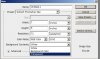
If the question is how to create a new document with a transparent not white background, here's how to do it.
Create your logo then create a new layer below the logo layer and put any color you want in it.
Then save as a png to keep the background transparent.
-
-
Guru
Re: Can I please have help please I am Confused!!!!!
Do what Hoogle said - save it in PNG format.
No background. Voila!
-
Posting Permissions
- You may not post new threads
- You may not post replies
- You may not post attachments
- You may not edit your posts
Forum Rules
Powered by
vBulletin® Version 4.1.9
Copyright © 2012 vBulletin Solutions, Inc. All rights reserved.
Content Relevant URLs by
vBSEO 3.6.0
Copyright 2011 Photoshop Gurus Forum. All rights reserved.