Hi Guys,
My name is Dan ... new to the PSG forum. Some great work across here!
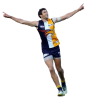
Im working on a little project with a sports image of my favourite team, yet i am having trouble getting one image to the way i want.
I am after the background to be removed, with the player still there. This is so i can use, to place on another document and print.
My attempts have all left small pieces close to the body, as well as some jagged body parts and not a clean image when printing. I really need the image to be clean, with no background traces. I don't feel it is a complicated background, just my skills are not up to scratch to get the image to the quality i want.
If any one could help me out, it would be kindly appreciated. I can paste the image via photo bucket link or send across via email.
Thanks, Dan.
My name is Dan ... new to the PSG forum. Some great work across here!
Im working on a little project with a sports image of my favourite team, yet i am having trouble getting one image to the way i want.
I am after the background to be removed, with the player still there. This is so i can use, to place on another document and print.
My attempts have all left small pieces close to the body, as well as some jagged body parts and not a clean image when printing. I really need the image to be clean, with no background traces. I don't feel it is a complicated background, just my skills are not up to scratch to get the image to the quality i want.
If any one could help me out, it would be kindly appreciated. I can paste the image via photo bucket link or send across via email.
Thanks, Dan.