+ Reply to Thread
Page 1 of 2 12 LastLast
Results 1 to 10 of 12
Like Tree3Likes

Thread: Adjustments Layer shows wrong icon

  1. #1
    Junior Member
    Join Date
    Feb 2013
    Location
    North West Alabama
    Posts
    18
    Thanks
    0
    Thanked 0 Times in 0 Posts

    Adjustments Layer shows wrong icon

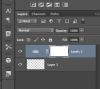
    When I click on the "Add Adjustments Layer" on the bottom right, it adds the layer ok in the browser. My question is why does the icon for the new layer not always represent the kind of adjustment layer that I just added.

    In the attachement, I added a Levels adjustment layer, but it shows the round "half-moon" sorta looking icon in the browser.

    I have noticed that on some of my PSD files, sometimes I have the little round icon and sometimes I have the correct icon for the adjustment layer that I have added.

    Is this correct? Is it a setting that I have tripped over, or maybe this indicates something else.

    TIA,

    Kirk
    Attached Thumbnails Attached Thumbnails Adjustments Layer shows wrong icon-ps_levels_adjustment_layer.png  


  2. #2
    Guru
    Join Date
    Jul 2009
    Location
    right in front of you
    Posts
    8,864
    Thanks
    28
    Thanked 215 Times in 211 Posts

    Re: Adjustments Layer shows wrong icon

    I tried reproduding I think you can click on the icon, right click and select view small or large thumbnail????

  3. #3
    Guru
    Join Date
    Sep 2012
    Location
    Texas
    Posts
    949
    Thanks
    13
    Thanked 91 Times in 87 Posts

    Re: Adjustments Layer shows wrong icon

    Hey iDad, I have been trying for over an hour to reproduce this and I can't! Did you find a way?

  4. #4
    Guru
    Join Date
    Jul 2009
    Location
    right in front of you
    Posts
    8,864
    Thanks
    28
    Thanked 215 Times in 211 Posts

    Re: Adjustments Layer shows wrong icon

    richt click on the eye the options drop down

  5. #5
    Guru
    Join Date
    Jul 2009
    Location
    right in front of you
    Posts
    8,864
    Thanks
    28
    Thanked 215 Times in 211 Posts

    Re: Adjustments Layer shows wrong icon

    I'm sorry not the eye but the icon for type of layer.

  6. #6
    Guru
    Join Date
    Sep 2012
    Location
    Texas
    Posts
    949
    Thanks
    13
    Thanked 91 Times in 87 Posts

    Re: Adjustments Layer shows wrong icon

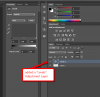
    Sorry, bad communication on my part. I'm referring to getting just the half moon icon to appear in the layers panel after adding an adjustment layer. Mine always adds this.........

    Adjustments Layer shows wrong icon-screen-shot-2013-02-05-1.08.04-pm.png

  7. #7
    Guru
    Join Date
    Jul 2009
    Location
    right in front of you
    Posts
    8,864
    Thanks
    28
    Thanked 215 Times in 211 Posts

    Re: Adjustments Layer shows wrong icon

    Attachment 27493thats the level icon see attachment

  8. #8
    Guru
    Join Date
    Dec 2012
    Posts
    619
    Thanks
    0
    Thanked 58 Times in 56 Posts

    Re: Adjustments Layer shows wrong icon

    So with your current screenshot, it looks fixed?
    +1 post count

  9. #9
    Guru
    Join Date
    Jul 2009
    Location
    right in front of you
    Posts
    8,864
    Thanks
    28
    Thanked 215 Times in 211 Posts

    Re: Adjustments Layer shows wrong icon

    are you asking me or Sam?

  10. #10
    Forum Moderator
    Join Date
    May 2011
    Location
    Perth W.A. the really hot state.
    Posts
    7,735
    Thanks
    62
    Thanked 353 Times in 346 Posts

    Re: Adjustments Layer shows wrong icon

    iBconfused
    MikeMc and IamSam like this.


Posting Permissions

  • You may not post new threads
  • You may not post replies
  • You may not post attachments
  • You may not edit your posts
Powered by vBulletin® Version 4.1.9
Copyright © 2013 vBulletin Solutions, Inc. All rights reserved.
Content Relevant URLs by vBSEO 3.6.0
Copyright 2011 Photoshop Gurus Forum. All rights reserved.
All times are GMT -5. The time now is 05:32 PM.