
I had headshots done of myself recently and I was doing my own retouching. I'm satisfied with the image and went to SAVE AS jpeg and the colors in the jpeg looks way off. The red are more red.
So, I figure, save as Tiff. I did with jpg as compression. It just didn't look right. I'm also worried about printing. The images that were imported in to photoshop did not have color issues.
well, here are a side by side comparison of what I am talking about: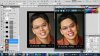
Notice how the colors on the right are more saturated? That's my concern.
Thanks!
So, I figure, save as Tiff. I did with jpg as compression. It just didn't look right. I'm also worried about printing. The images that were imported in to photoshop did not have color issues.
well, here are a side by side comparison of what I am talking about:
Notice how the colors on the right are more saturated? That's my concern.
Thanks!


 The best you can do is calibrate your monitor - not with microsofts brightness settings but an actual gretag program or something of the like and not embed profiles. The last part because every picture looks the same on a calibrated monitor as long as it does not have an embedded icc profile. Then your PS will match whatever program. But for someone who has an uncalibrated monitor viewing your photo the color will vary. You can account for your own color but you cannot guarantee it outside of your computer specifically..

