+ Reply to Thread
Page 1 of 2 12 LastLast
Results 1 to 10 of 11
  1. #1
    Junior Member
    Join Date
    Sep 2010
    Posts
    6
    Thanks
    0
    Thanked 0 Times in 0 Posts

    Angry Photoshop Text Font

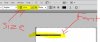
    Photoshop Text Font-capture1.jpg

    In Photoshop CS5 when I try to type something the font size is so small.I selected size 12 and the font is more like 5-6. What should I do? I tried reseting type tool but didnt work I uninstalled and installed again but didnt work either

  2. #2
    Guru
    Join Date
    Aug 2010
    Location
    The Abyss
    Posts
    952
    Thanks
    0
    Thanked 0 Times in 0 Posts

    Re: Photoshop Text Font

    Depends on how big your document or canvas is, if it's huge then a 12pt font will look small. How big is the canvas?
    You can call me Kev, if you need anything just ask! Please take a moment to read the rules here!
    FORUM RULES PLEASE READ - CLICK HERE TO READ
    FREELANCE SECTION RULES - CLICK HERE TO READ

  3. #3
    Junior Member
    Join Date
    Sep 2010
    Posts
    6
    Thanks
    0
    Thanked 0 Times in 0 Posts

    Re: Photoshop Text Font

    Photoshop Text Font-capture4.jpgthe thing is that the type size doesnt change when canvas size changes

  4. #4
    Guru
    Join Date
    Aug 2010
    Location
    The Abyss
    Posts
    952
    Thanks
    0
    Thanked 0 Times in 0 Posts

    Re: Photoshop Text Font

    Bump your font size up to maybe 24 see what that looks like...
    You can call me Kev, if you need anything just ask! Please take a moment to read the rules here!
    FORUM RULES PLEASE READ - CLICK HERE TO READ
    FREELANCE SECTION RULES - CLICK HERE TO READ

  5. #5
    Guru
    Join Date
    Apr 2002
    Posts
    1,551
    Thanks
    0
    Thanked 36 Times in 13 Posts

    Re: Photoshop Text Font

    go to Image --> Image Size what is the resolution set at? If this is for web or screen set it to 72dpi.

  6. #6
    Junior Member
    Join Date
    Sep 2010
    Posts
    6
    Thanks
    0
    Thanked 0 Times in 0 Posts

    Re: Photoshop Text Font

    Quote Originally Posted by Gaussian View Post
    go to Image --> Image Size what is the resolution set at? If this is for web or screen set it to 72dpi.
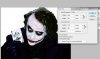
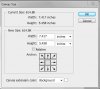
    I opened a random image andthis is what i got
    Photoshop Text Font-joker.jpg

  7. #7
    Junior Member
    Join Date
    Sep 2010
    Posts
    6
    Thanks
    0
    Thanked 0 Times in 0 Posts

    Re: Photoshop Text Font

    Quote Originally Posted by Dezigns Unlimited View Post
    Bump your font size up to maybe 24 see what that looks like...
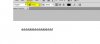
    Photoshop Text Font-24.jpg


    this looks more like 12....

  8. #8
    Guru
    Join Date
    Apr 2002
    Posts
    1,551
    Thanks
    0
    Thanked 36 Times in 13 Posts

    Re: Photoshop Text Font

    Resolution 1 pixels/inch.... that is your problem....change that to 72.

  9. #9
    Junior Member
    Join Date
    Sep 2010
    Posts
    6
    Thanks
    0
    Thanked 0 Times in 0 Posts

    Re: Photoshop Text Font

    Quote Originally Posted by Gaussian View Post
    Resolution 1 pixels/inch.... that is your problem....change that to 72.
    change it to 72 pixels/inch?

  10. #10
    Guru
    Join Date
    Apr 2002
    Posts
    1,551
    Thanks
    0
    Thanked 36 Times in 13 Posts

    Re: Photoshop Text Font

    Yes, but take a quick note of the pixel dimensions and after you adjust the resolution change the pixel dimensions back to the same as they were.

    Text "point" size in Photoshop is relative to the resolution, with 1 pixel/inch resolution will case text point sizes to scale way down.


Posting Permissions

  • You may not post new threads
  • You may not post replies
  • You may not post attachments
  • You may not edit your posts
Powered by vBulletin® Version 4.1.9
Copyright © 2012 vBulletin Solutions, Inc. All rights reserved.
Content Relevant URLs by vBSEO 3.6.0
Copyright 2011 Photoshop Gurus Forum. All rights reserved.
All times are GMT -5. The time now is 03:19 PM.
vBulletin Skins