
Hello,
I usualy get this error and i'm getting crazy of it
The thing is, that accidentally i press some kind of button combination, and after that every time i select some layer, the channels are unmarked. So i need to press on layer and then on channel RGB to continue my work. And this i must do every time i select some layer.
Plz help, i know the solution must be very simple
P.S. i use cs2
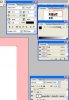
P.S.2 i added SS if my explain isn't clear enouth
I usualy get this error and i'm getting crazy of it
The thing is, that accidentally i press some kind of button combination, and after that every time i select some layer, the channels are unmarked. So i need to press on layer and then on channel RGB to continue my work. And this i must do every time i select some layer.
Plz help, i know the solution must be very simple
P.S. i use cs2
P.S.2 i added SS if my explain isn't clear enouth
Last edited:

