
Photoshop Gurus Forum
Welcome to Photoshop Gurus forum. Register a free account today to become a member! It's completely free. Once signed in, you'll enjoy an ad-free experience and be able to participate on this site by adding your own topics and posts, as well as connect with other members through your own private inbox!
You are using an out of date browser. It may not display this or other websites correctly.
You should upgrade or use an alternative browser.
You should upgrade or use an alternative browser.
crop and straighten problem
- Thread starter legala88
- Start date

Dezigns Unlimited
Guru
- Messages
- 934
- Likes
- 11
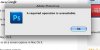
Can you get a screen shot of this error?
Dezigns Unlimited
Guru
- Messages
- 934
- Likes
- 11
Look on your keyboard for the PRT SCRN button...

Steve
Retired Administrator
- Messages
- 7,720
- Likes
- 1,475
print screen mac - Google Search
Google will help you here. :google:
Substitute Ctrl+V with whatever you use to Paste after a copy.
Google will help you here. :google:
Substitute Ctrl+V with whatever you use to Paste after a copy.
Dezigns Unlimited
Guru
- Messages
- 934
- Likes
- 11
I'm not sure, Google offers nothing but some Plugin error string..
"$$$/Plugins/Automation/CropPhotosAuto/Error/RequiredOpNotAvailable=A required operation is unavailable."
"$$$/Plugins/Automation/CropPhotosAuto/Error/RequiredOpNotAvailable=A required operation is unavailable."
Steve
Retired Administrator
- Messages
- 7,720
- Likes
- 1,475
A google search for that phrase has 2 hits and one of them is this thread.
Are you having any other PS issues?
Is it happening on all your images or just a few?
I have no idea but there are a couple of things you should do anyway.
Reset your preferences file - Read how to do it HERE.
Cold boot your computer. Turn it off then back on, not just restart.
Make sure PS is up to date. Use Help|Updates to get the latest PS updates.
Make sure you have the most current video drivers installed on your computer.
Try turning off OpenGL settings Command+K then go to Performance
Are you having any other PS issues?
Is it happening on all your images or just a few?
I have no idea but there are a couple of things you should do anyway.
Reset your preferences file - Read how to do it HERE.
Cold boot your computer. Turn it off then back on, not just restart.
Make sure PS is up to date. Use Help|Updates to get the latest PS updates.
Make sure you have the most current video drivers installed on your computer.
Try turning off OpenGL settings Command+K then go to Performance