
+ Reply to Thread
Results 1 to 5 of 5
  1. #1
    Newbie
    Join Date
    May 2011
    Posts
    2
    Thanks
    0
    Thanked 0 Times in 0 Posts

    Sometimes panorama stitching doesn't blend images

    Occasionally when I try to stich photos together with the panorama tool it will put all the photos in the right place but it doesn't actually blend them smoothly together, depite having the blend box checked. It doesn't give an error message, and it doesn't even try to create the layer masks that it has when it does successfully blend all the images in a panorama.

    Has anyone run into this problem and solved it? Is there something about the image that might be doing it? Is there a limit on how many images photoshop will blend? The ram is pretty much pegged while it's compositing the image, and that doesn't seem to stop it from putting the images in the right place, but maybe it does stop blending?

    Here's the one of the images it fails on:
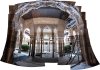
    Sometimes panorama stitching doesn't blend images-dsc_0285-edit.jpg

    By the way, this is on Windows 7 x64 with 64 bit installation of Photoshop CS4.

  2. #2
    Administrator
    Join Date
    Jul 2010
    Location
    New Jersey, USA
    Posts
    4,744
    Thanks
    12
    Thanked 160 Times in 150 Posts

    Re: Sometimes panorama stitching doesn't blend images

    I've never had that problem.
    There are 3 things I would try.

    Try running PS in 32bit mode.
    I've read threads where people were having problems in 64 bit that they weren't getting in 32bit.

    Try merging in groups if possible.
    If you have 6 images try 3 and 3, and them merge those.

    As a test try reducing the size of all of the images and merge the smaller copies.
    Maybe you don't have enough ram to process the images properly.

    These are all guesses on my part so good luck.

  3. #3
    Newbie
    Join Date
    May 2011
    Posts
    2
    Thanks
    0
    Thanked 0 Times in 0 Posts

    Re: Sometimes panorama stitching doesn't blend images

    Trying a few at a time seems to work better, thanks for the suggestion

  4. #4
    Administrator
    Join Date
    Jul 2010
    Location
    New Jersey, USA
    Posts
    4,744
    Thanks
    12
    Thanked 160 Times in 150 Posts

    Re: Sometimes panorama stitching doesn't blend images

    Your welcome.
    The way you explained it it sounded like a memory issue.

  5. #5
    Member
    Join Date
    Dec 2010
    Location
    Seattle
    Posts
    55
    Thanks
    0
    Thanked 0 Times in 0 Posts

    Re: Sometimes panorama stitching doesn't blend images

    very much image dependent... overlapping more always helps...
    think of it this way, the more you move side-to-side, and up-n-down from the normal shot...
    the more images you will need at the extreme edges, PS is trying to make one image...

    in the image posted, I would have also followed the chained barrier/fence...
    any strong leading lines, follow with more images...
    follow a pattern, then add several random images, to help overlap...
    never think you have too many images... just allow PS to have more time...

    also use the longest lens, to reduce the distortion at shooting stage, as PS will add it back
    while making a super-wide image...

    obviously... manual focus that remains unchanged...

    rather than down-sizing the images before merging... much easier to shoot smaller files...
    PS will be making a very large file, with many smaller ones, and building/adding... resolution...

    again... every image will be different, depending on the lines/detail... and the amount of angle you expand to...

    hope this helps...


Tags for this Thread

Posting Permissions

  • You may not post new threads
  • You may not post replies
  • You may not post attachments
  • You may not edit your posts
Powered by vBulletin® Version 4.1.9
Copyright © 2012 vBulletin Solutions, Inc. All rights reserved.
Content Relevant URLs by vBSEO 3.6.0
Copyright 2011 Photoshop Gurus Forum. All rights reserved.
All times are GMT -5. The time now is 03:35 PM.
vBulletin Skins