Evening all -
First post here at PS Gurus. I hope that you guys can lend your expertise in pinning down an issue that I am having and have also had on other PS versions. I am running
Windows 7 (64 bit) Ultimate
2600k / 8 gb ram / 256 Samsung SSD / 460 GTX 1GB
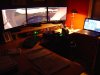
Matrox Triplehead 2 Go with x3 22" monitors (resolution 5040 x1050)
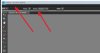
A fresh install of the trial version of PSE 9 is yielding corrupt main toolbar and options bar (for each tool selected). The application is expanding full screen on all three monitors just fine but the toolbar are corrupt - partly transparent / party compressed to the left. No matter what I have done in terms of resizing the application window the results are the same or get worse.
On another computer I installed PS CS5 (also under win7 64 bit environment) and I was having the same issue. However, at the time I thought the install was bad in some shape or form so I dropped the issue.
I am now considering PSE 9 but see that Win7 + Matrox just isn't working correctly with this combination of hardware / software components.
Has anyone see this issue or know of a potential fix? I have read a couple of threads on the net with similar issues but I don't see any resolution. Your help is greatly appreciated.
Thanks-
Benjamin
First post here at PS Gurus. I hope that you guys can lend your expertise in pinning down an issue that I am having and have also had on other PS versions. I am running
Windows 7 (64 bit) Ultimate
2600k / 8 gb ram / 256 Samsung SSD / 460 GTX 1GB
Matrox Triplehead 2 Go with x3 22" monitors (resolution 5040 x1050)
A fresh install of the trial version of PSE 9 is yielding corrupt main toolbar and options bar (for each tool selected). The application is expanding full screen on all three monitors just fine but the toolbar are corrupt - partly transparent / party compressed to the left. No matter what I have done in terms of resizing the application window the results are the same or get worse.
On another computer I installed PS CS5 (also under win7 64 bit environment) and I was having the same issue. However, at the time I thought the install was bad in some shape or form so I dropped the issue.
I am now considering PSE 9 but see that Win7 + Matrox just isn't working correctly with this combination of hardware / software components.
Has anyone see this issue or know of a potential fix? I have read a couple of threads on the net with similar issues but I don't see any resolution. Your help is greatly appreciated.
Thanks-
Benjamin