
sundaymonday
New Member
- Messages
- 1
- Likes
- 0
Hello,
I have been trying to figure this out for a while. There doesn't seem to any mention of this on the internet (that I can find). I will try my best to explain what is happening.
When I paint in photoshop the cursor will randomly turn into the waiting symbol, It will never stop 'waiting' but I'm still able to paint. I can't change the brush, or click on anything else, like its crashed. I always have to force quit the app to stop it.
I have tried stripping back my preferences to no openGL, running in 32 bit mode etc but it still crashes.
SYSTEM
PhotoShop CS 5
Lion 10.7.2
macPro 3.1
10 GB Memory
ATI Radeon HD 5770
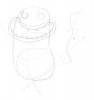
Picture below shows how simple the task was to cause it to hang. The scribble lines is what I was able to do while it was spinning.
Thanks
J
I have been trying to figure this out for a while. There doesn't seem to any mention of this on the internet (that I can find). I will try my best to explain what is happening.
When I paint in photoshop the cursor will randomly turn into the waiting symbol, It will never stop 'waiting' but I'm still able to paint. I can't change the brush, or click on anything else, like its crashed. I always have to force quit the app to stop it.
I have tried stripping back my preferences to no openGL, running in 32 bit mode etc but it still crashes.
SYSTEM
PhotoShop CS 5
Lion 10.7.2
macPro 3.1
10 GB Memory
ATI Radeon HD 5770
Picture below shows how simple the task was to cause it to hang. The scribble lines is what I was able to do while it was spinning.
Thanks
J
