
+ Reply to Thread
Results 1 to 8 of 8
  1. #1
    Junior Member
    Join Date
    Oct 2011
    Posts
    10
    Thanks
    0
    Thanked 0 Times in 0 Posts

    Very very odd color changes based on size.

    Specs: I'm running windows 7 64 bit home edition and photoshop CS5 extended.

    Okay, this is the strangest thing that has happened to me in my years of photoshop use... I just finished my newest photo-manipulation, and the character in it had a burgundy color which is visible at smaller sizes.(I'm talking about a flat JPEG image, this is a not a .psd problem) Once I set it to my background, view it in full screen, or everything that I uploaded to deviant art....The colors wash out, some things aren't as dark, and the character is no longer burgundy.

    I'm going to try to attach a screen shot of how it should look, and a screen shot of the background problem.
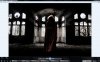
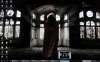
    Very very odd color changes based on size.-ypic_cyrus-pc_20111028-185700.jpgVery very odd color changes based on size.-ypic_cyrus-pc_20111028-185713.jpg

  2. #2
    Guru
    Join Date
    Jan 2011
    Location
    Elizabeth Port NJ
    Posts
    1,503
    Thanks
    15
    Thanked 149 Times in 143 Posts

    Re: Very very odd color changes based on size.

    Hi cyruswiz

    If you updated your software lately make sure your system is using the right color profile, also make sure that you are using the correct Photoshop color settings, some times color profiles get messed up.

    If that doesn't work try resetting your PS preferences file by holding "Alt+Crtl+Shift" while PS is starting up.

    Also you can take a look at this, Photoshop CS5 - Color Management

    Hope this helps.

    Cuando soy Bueno, soy muy BUENO
    Pero cuando soy malo, soy mucho MEJOR

  3. #3
    Junior Member
    Join Date
    Oct 2011
    Posts
    10
    Thanks
    0
    Thanked 0 Times in 0 Posts

    Re: Very very odd color changes based on size.

    I haven't updated recently, that I know of. And I was just using it last night and that image came out fine...

    I'm not trying to be rude, this is an honest question:
    Could any of that make a jpeg look different when it's different sizes?
    I'm not talking about it looking one way in photoshop and one way as a jpeg. Just like the jpeg, and the jpeg at full screen or as a desktop background and the colors change.

    I kind of think if a JPEG as being carved in stone...once you flatten it it looks how it looks. But this is apparently not the case

  4. #4
    Junior Member
    Join Date
    Oct 2011
    Posts
    10
    Thanks
    0
    Thanked 0 Times in 0 Posts

    Re: Very very odd color changes based on size.

    bump* any ideas? I guess I could just give up and ignore it, hoping the problem doesn't show up again.. Just wondering what it was.

  5. #5
    Administrator
    Join Date
    Jul 2010
    Location
    New Jersey, USA
    Posts
    4,744
    Thanks
    12
    Thanked 160 Times in 150 Posts

    Re: Very very odd color changes based on size.

    In both cases it's the same exact file?

  6. #6
    Forum Mod
    Join Date
    Jun 2011
    Location
    Uk
    Posts
    5,620
    Thanks
    85
    Thanked 449 Times in 424 Posts

    Re: Very very odd color changes based on size.

    I can see it is slightly washed out is the jpeg in photoshop set to cmyk colour and your pc default colour scheme is RGB or you have 2 different colour rgb profiles set photoshop is probably set to adobe RGB 1998 and windows could have been altered go into display settings and choose colour scheme make sure they mach. I am assuming your jpeg has not been stretched.

  7. #7
    Junior Member
    Join Date
    Oct 2011
    Posts
    10
    Thanks
    0
    Thanked 0 Times in 0 Posts

    Re: Very very odd color changes based on size.

    Steve- Yes, the same JPEG image.
    Hoogleman- the JPEG is standard RGB color, and my PC default is RGB. Photoshop is not set to RGB 1998, it's on sRGB IEC61966-2.1 it says. Windows colors are okay, and the image has not been stretched. :/
    sRGB IEC61966-2.1

  8. #8
    Forum Mod
    Join Date
    Jun 2011
    Location
    Uk
    Posts
    5,620
    Thanks
    85
    Thanked 449 Times in 424 Posts

    Re: Very very odd color changes based on size.

    open up the image in photoshop go to edit > colour settings you should see in the top drop down menu an option for monitor as the colour select that and press ok if the image looks like it needs tweaking then do it save it as a jpeg or preferably a png and then reasign it as your wallpaper.


Tags for this Thread

Posting Permissions

  • You may not post new threads
  • You may not post replies
  • You may not post attachments
  • You may not edit your posts
Powered by vBulletin® Version 4.1.9
Copyright © 2012 vBulletin Solutions, Inc. All rights reserved.
Content Relevant URLs by vBSEO 3.6.0
Copyright 2011 Photoshop Gurus Forum. All rights reserved.
All times are GMT -5. The time now is 04:33 PM.
vBulletin Skins