+ Reply to Thread
Results 1 to 4 of 4
  1. #1
    Newbie
    Join Date
    Nov 2011
    Posts
    2
    Thanks
    1
    Thanked 0 Times in 0 Posts

    Colour Picker Corruption

    Hi,

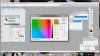
    I have Photoshop cs and the colour picker seems to be corrupted.

    Colour Picker Corruption-colour-picker.jpg

    as you can see in the screenshot it has spectrum colours in the picker section. I have tried "purge all" and it made no difference. Any thoughts?

    Many thanks

    James
    Attached Images Attached Images

  2. #2
    Administrator
    Join Date
    Jul 2010
    Location
    New Jersey, USA
    Posts
    4,744
    Thanks
    12
    Thanked 160 Times in 150 Posts

    Re: Colour Picker Corruption

    Make sure you have the most current video driver if that doesn't help try resetting your preferences file.

    Start Photoshop and immediately hold down Ctrl+Alt+Shift (Windows)
    or Command+Option+Shift (Mac OS X).

    Then, click Yes to the message, "Delete the Adobe Photoshop Settings file?"

  3. #3
    Guru
    Join Date
    Mar 2010
    Location
    Mesa, Arizona
    Posts
    1,108
    Thanks
    0
    Thanked 71 Times in 70 Posts

    Re: Colour Picker Corruption

    Checkbox H is what you want, you have L checked according to your screenshot:

  4. The Following User Says Thank You to hawkeye For This Useful Post:

    James Ferguson (11-11-2011)

  5. #4
    Newbie
    Join Date
    Nov 2011
    Posts
    2
    Thanks
    1
    Thanked 0 Times in 0 Posts

    Re: Colour Picker Corruption

    Yes, that was it - whoops never noticed that before. Thanks.

    James


Tags for this Thread

Posting Permissions

  • You may not post new threads
  • You may not post replies
  • You may not post attachments
  • You may not edit your posts
Powered by vBulletin® Version 4.1.9
Copyright © 2012 vBulletin Solutions, Inc. All rights reserved.
Content Relevant URLs by vBSEO 3.6.0
Copyright 2011 Photoshop Gurus Forum. All rights reserved.
All times are GMT -5. The time now is 04:34 PM.
vBulletin Skins