-
Junior Member
Global Shadows
Hey Guys,
I am currently designing a website for a client, I have got the general layout but i've came across a problem I haven't came across before. When I apply a shadow to a layer it applies them to all the layers.. I am sure they're a simple fix to this but I am currently unaware of how to stop it.
Thanks Nai
-
-
Guru
Re: Global Shadows
Hi Nai
Welcome to PhotoShop Gurus.
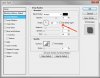
You need to make sure that in your layer style panel, the "use global light" box, is unchecked, other ways as you mentioned, every time you apply a drop shadow to any other layer, it will affect to all the rest of the layers using the same layer style, "Drop Shadow".

Hope this helps.
Cuando soy Bueno, soy muy BUENO
Pero cuando soy malo, soy mucho MEJOR
-
-
Junior Member
Re: Global Shadows
Wow thanks for the fast reply!
I don't know when I checked that checkbox, can finally get the shadows sorted on all the layers.
Thanks again!
-
-
Junior Member
Re: Global Shadows
me too getting this problem but i don know how to solve this ,, in recent only i came to know about this forum site. this site helping me in most of the problem solving in my work. thnks for your explanation along with example. ..
-
Tags for this Thread
Posting Permissions
- You may not post new threads
- You may not post replies
- You may not post attachments
- You may not edit your posts
Forum Rules
Powered by
vBulletin® Version 4.1.9
Copyright © 2012 vBulletin Solutions, Inc. All rights reserved.
Content Relevant URLs by
vBSEO 3.6.0
Copyright 2011 Photoshop Gurus Forum. All rights reserved.