eksekseksg3
New Member
- Messages
- 1
- Likes
- 0
Hello,
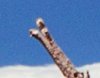
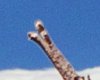
Recently I've been constantly bugged by a problem I just can't seem to figure out. When cutting something and pasting it directly in place, there is still an extra outline around it, almost as if I had a feather or something enabled. I've checked and double checked, there is no feather or anti-aliasing enabled. This has happened with the quick-select tool, the normal lasso, and using the pen-tool to make a selection. You can see what I mean from the two photos I'm attaching, the first is what it looks like before I cut, and the second one is what it looks like after I cut it and paste it in place. Just so you have an idea of what I'm doing this for; I'm putting some text on the photo and I want it to look like the branch is hovering over the lettering, so I want just a straight pixel-for-pixel cut.
Thanks in advance!
Recently I've been constantly bugged by a problem I just can't seem to figure out. When cutting something and pasting it directly in place, there is still an extra outline around it, almost as if I had a feather or something enabled. I've checked and double checked, there is no feather or anti-aliasing enabled. This has happened with the quick-select tool, the normal lasso, and using the pen-tool to make a selection. You can see what I mean from the two photos I'm attaching, the first is what it looks like before I cut, and the second one is what it looks like after I cut it and paste it in place. Just so you have an idea of what I'm doing this for; I'm putting some text on the photo and I want it to look like the branch is hovering over the lettering, so I want just a straight pixel-for-pixel cut.
Thanks in advance!