
-
Discrepancies between workspace colors, and saved files...pls help
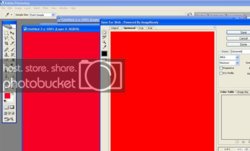
Im having some color discrepancies in ps cs2. The colors that i see on my workspace(psd) are different from the colors that appear when i save the image. Check the screen grab for an example. This effect is way more pronounced on my screen.
Why is this happening? Any help would be appreciated.
-
-
Member
Re: Discrepancies between workspace colors, and saved files...pls help
Hi and welcome to the board.
I've never seen this problem before and I quite frankly can't think of any cause right now, but have you tried to delete the
preference-file? Sometimes that kills odd problems.
C:\Documents and Settings\[YOURUSERNAME]\Application Data\Adobe\Photoshop\9.0\Adobe Photoshop CS2 Settings\
look for the prefs file and delete it.
M
rten
-
-
Member
Re: Discrepancies between workspace colors, and saved files...pls help
I had a similar problem in PS 7 (which I still use) and was able to fix it this way. Go to Edit>Color Settings and select sRGB. Don't know if it'll work for you but it's worth a shot.
Rich
-
Posting Permissions
- You may not post new threads
- You may not post replies
- You may not post attachments
- You may not edit your posts
Forum Rules
Powered by
vBulletin® Version 4.1.9
Copyright © 2012 vBulletin Solutions, Inc. All rights reserved.
Content Relevant URLs by
vBSEO 3.6.0
Copyright 2011 Photoshop Gurus Forum. All rights reserved.