-
Saving slices without putting them in an "images" folder?
Is there a way to stop photoshop from putting all my slices into an "images" folder? I want it to overwrite files in a folder that's not called "images," but it always creates a new "images" folder arbitrarily, which means I always have to go manually move them to the correct location.
Any help??
Thanks,
Kenny
-
-
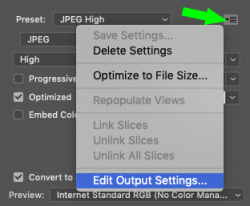
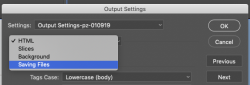
ahh, just found it. Go to Save for Web, optimize it, click save, then in the Settings dropdown of the Save dialog, select "Other..." and you can uncheck "Put images in folder"
-
-
Re: Saving slices without putting them in an "images" folder?
Thank you for figuring that out. Images folder has been driving me crazy!!! Now if only I could name a file without including the slice number. But I guess I can live with that.
-
-
Re: Saving slices without putting them in an "images" folder?

Originally Posted by
murph17
Now if only I could name a file without including the slice number. But I guess I can live with that.
When using the slicetool, double click on the blue tag and it will prompt you with properties. The name property will ultimately be the filename given to that specific slice. Hope that's what you meant.
-
Posting Permissions
- You may not post new threads
- You may not post replies
- You may not post attachments
- You may not edit your posts
Forum Rules
Powered by
vBulletin® Version 4.1.9
Copyright © 2012 vBulletin Solutions, Inc. All rights reserved.
Content Relevant URLs by
vBSEO 3.6.0
Copyright 2011 Photoshop Gurus Forum. All rights reserved.