
I'm noticing that my Photoshop (I have 7 and CS2) on my pc (Vista) is acting up lately... Just last week I was making websites with curved edges by going into photshop and using:
SELECT-->>MODIFY-->>BORDER
but I've noticed that from time to time (because I don't know what causes it) Photoshop will some how change how it handles this function... sometimes when I use it it will normally just go ahead and select the area I told it to select and cut it out with a straight SHARP cut, but other times it does some funky stuff and instead makes a gradient that will not 100% cut off the selection, but instead just go and erase it in a gradient. so the edges are soft... which I really don't want the program to be doing of its own accord... because If i want that I usually just go through layer styles.
Here is a screen shot to better illustrate what I'm talking about:
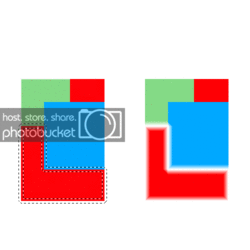
as you may notice... the selection on the left is all wrong... when I originally did that selection It was supposed to make a border that goes inward on the selection (as it usually does) and make a sharp cut... but for some reason its not doing it now... and I really need it because I'm heavily into web design atm.
Also If you want to see where I got the idea to approach making round edges this way look here:
Rounded Edges- Photoshop Tutorials- Depiction
and yeah I know that there are other ways to approach this in Photoshop but this way is so much quicker and i'd hate to have to lose this option.
SELECT-->>MODIFY-->>BORDER
but I've noticed that from time to time (because I don't know what causes it) Photoshop will some how change how it handles this function... sometimes when I use it it will normally just go ahead and select the area I told it to select and cut it out with a straight SHARP cut, but other times it does some funky stuff and instead makes a gradient that will not 100% cut off the selection, but instead just go and erase it in a gradient. so the edges are soft... which I really don't want the program to be doing of its own accord... because If i want that I usually just go through layer styles.
Here is a screen shot to better illustrate what I'm talking about:
as you may notice... the selection on the left is all wrong... when I originally did that selection It was supposed to make a border that goes inward on the selection (as it usually does) and make a sharp cut... but for some reason its not doing it now... and I really need it because I'm heavily into web design atm.
Also If you want to see where I got the idea to approach making round edges this way look here:
Rounded Edges- Photoshop Tutorials- Depiction
and yeah I know that there are other ways to approach this in Photoshop but this way is so much quicker and i'd hate to have to lose this option.
