
3Likes
-
Guru
Did you know: Burn Tool + ALT = Lighten Tool
Of course, 90% of you knows it allready. But if you aren't in that percentage and don't "waste" time reading manuals then you know now.
Burn Tool:
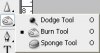
With pressed ALT key Burn Tool turns into "Lighten" Tool. Options for it are same as Burn Tool, so bigger % in Exposure it will lighten more place you paint with it.
Tip: don't set Exposure more that 5% (maximum 10%). Better paint twice that will be more accurate.
Usage: For quick lighten some places on image without masking and selectiong. In overall it isn't most precise tool in PS. But for quick and fast lighten it's good. Like 5cents improvment in 5 seconds. Good deal 
Hope it's usefull.
P.S. I found it years ago by accident and keep using it almost everyday.
-
-
Forum Moderator
Re: Did you know: Burn Tool + ALT = Lighten Tool
I bet theres more short cuts and tricks to this than any of us realise, the more short cuts the better lol.
Thanks Senior
-
-
Guru
Re: Did you know: Burn Tool + ALT = Lighten Tool
Welcomen mate!
I bet there are tons of them.
-
-
Forum Moderator
Re: Did you know: Burn Tool + ALT = Lighten Tool
do you know how to print screen then transfer to photoshop in new file open and make the size you want then press ctrl v this brings the screen capture up into that new frame you just made, but you already knew that one mate lol.
-
-
Guru
Re: Did you know: Burn Tool + ALT = Lighten Tool
One of the first things learned
-
-
Forum Moderator
Re: Did you know: Burn Tool + ALT = Lighten Tool
Lol.
How about the sleep button then?
-
-
Guru
Re: Did you know: Burn Tool + ALT = Lighten Tool
Don't have one
-
-
Forum Moderator
Re: Did you know: Burn Tool + ALT = Lighten Tool
press the sleep button on your keyboard it turns the screen off
-
-
Guru
Re: Did you know: Burn Tool + ALT = Lighten Tool
LoL...actually it suppose to put system in sleep mode by default (i think). I had one ages ago.
It can be configured to do almost anything like to format harddisk if there is such need (or you want to make "joke" with someone).
-
-
Forum Mod
Re: Did you know: Burn Tool + ALT = Lighten Tool
with photoshop it does not recognise the clipboard when it is open if you close photoshop and open it again and select file new and set size to clipboard then go to edit paste it will import your screen capture. I do not get on with the burn tool I use 2 adjustment layers 1 with a curves adjustment to darken the image and another 1 with a lightened curves invert the mask and gradually brush in the effects does the same as burn and dodge tools but far more accurate if your using a low opacity brush and gradually build up the effect.
-
Tags for this Thread
Posting Permissions
- You may not post new threads
- You may not post replies
- You may not post attachments
- You may not edit your posts
Forum Rules
Powered by
vBulletin® Version 4.1.9
Copyright © 2013 vBulletin Solutions, Inc. All rights reserved.
Content Relevant URLs by
vBSEO 3.6.0
Copyright 2011 Photoshop Gurus Forum. All rights reserved.
All times are GMT -5. The time now is 10:14 PM.