+ Reply to Thread
Page 1 of 2 12 LastLast
Results 1 to 10 of 13
Like Tree4Likes

Thread: Pen Tool: Random Horse (needs comments)

  1. #1
    Guru
    Join Date
    Jul 2011
    Location
    on a computer... duuh
    Posts
    1,331
    Thanks
    90
    Thanked 40 Times in 38 Posts

    Pen Tool: Random Horse (needs comments)

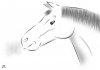
    just decided it was about time i confronted my worst enemy in photoshop and made it my best friend.
    Pen Tool: Random Horse (needs comments)-penpractice.jpg
    it was originally a doodle in my art book, i thought it might be good to practice with it in photoshop.

    EVERYTHING apart from one bit (the little puff of air) was done with the pen tool and filters (Gaussian blur), the hair was a brush i had made with the pen tool.

    anyway, this one to me is in desperate need of a few comments as i need to know if it's an okay job or not.

    and yes the lines are meant to be like that, the continuous lines didn't look right.

    So, what's good, What's bad?
    be honest but not harsh please.
    Last edited by Zeealex; 01-22-2012 at 11:59 AM.
    Stefano likes this.

  2. #2
    Forum Mod
    Join Date
    Jun 2011
    Location
    Imperial Beach, CA, US
    Posts
    3,575
    Thanks
    97
    Thanked 218 Times in 217 Posts

    Re: Pen Tool: Random Horse (needs comments)

    Very nice Zee. I have no negative comments. Considering you haven't used the pen tool if you could help it, lol, I think it is tremendous. I would have thought it good if you were a master of the pen. And I knew the lines were meant to be that way .

    I would like to see you do a couple of intricate selections as well. Once you do that, you will not consider the pen your enemy! It took me finding 3 different tutorials to get it right. I'm slow I guess. But each one explained an aspect the other hadn't or provided technique or tips that I hadn't discovered yet. Meantime, nice horse!
    Zeealex likes this.

  3. #3
    Guru
    Join Date
    Jul 2011
    Location
    on a computer... duuh
    Posts
    1,331
    Thanks
    90
    Thanked 40 Times in 38 Posts

    Re: Pen Tool: Random Horse (needs comments)

    thanks clare! glad you like it

  4. #4
    Senior Member
    Join Date
    Jan 2012
    Location
    Croatia
    Posts
    166
    Thanks
    0
    Thanked 4 Times in 4 Posts

    Re: Pen Tool: Random Horse (needs comments)

    Zee i really like it. .You need to teach me how to do something like this :O
    Zeealex likes this.

  5. #5
    Forum Mod
    Join Date
    Jun 2011
    Location
    Uk
    Posts
    5,620
    Thanks
    85
    Thanked 449 Times in 424 Posts

    Re: Pen Tool: Random Horse (needs comments)

    Well I never thought I would see something like this coming from you I really like the simplicity and you have done a really good job.

    Keep it up Zeealex

  6. #6
    Guru
    Join Date
    Jul 2011
    Location
    on a computer... duuh
    Posts
    1,331
    Thanks
    90
    Thanked 40 Times in 38 Posts

    Re: Pen Tool: Random Horse (needs comments)

    thank you guys
    sean. i found it good to get a hand drawn image and scan it in, then try to follow it with the pen tool as soon as you've followed a couple of pen tool tutorials to get used to it.

    Hoogle, thanks, i think it would be best to start off simple if i go into anything too complex i'd probably get really confused and frustrated. XD

  7. #7
    Member
    Join Date
    Nov 2011
    Posts
    73
    Thanks
    0
    Thanked 1 Time in 1 Post

    Re: Pen Tool: Random Horse (needs comments)

    for me it great! keep it up!
    Zeealex likes this.

  8. #8
    Forum Mod
    Join Date
    Jun 2011
    Location
    Imperial Beach, CA, US
    Posts
    3,575
    Thanks
    97
    Thanked 218 Times in 217 Posts

    Re: Pen Tool: Random Horse (needs comments)

    Quote Originally Posted by Zeealex View Post
    thank you guys
    sean. i found it good to get a hand drawn image and scan it in, then try to follow it with the pen tool as soon as you've followed a couple of pen tool tutorials to get used to it. XD
    Ah Zee, ignore my comment about making selections. I didn't know you were tracing a design and that makes for similar learning on how to use the pen tool. Love ya girlie!

  9. #9
    Guru
    Join Date
    Jul 2011
    Location
    on a computer... duuh
    Posts
    1,331
    Thanks
    90
    Thanked 40 Times in 38 Posts

    Re: Pen Tool: Random Horse (needs comments)

    like i said, it was only a sketchbook doodle, nothing exciting until i got it in photoshop and drew out the lines correctly
    and any suggestion is a great one clare, i'll try the selections as i have allot of game skinning to do so it will really help out with the game skins and the pen tool

  10. #10
    Guru
    Join Date
    Jul 2011
    Location
    on a computer... duuh
    Posts
    1,331
    Thanks
    90
    Thanked 40 Times in 38 Posts

    Re: Pen Tool: Random Horse (needs comments)

    just did this really quickly as a pen tool doodle without using a base image. it ties in with this thread so to save making up a new one i'll put it here. comments are welcomed!
    Pen Tool: Random Horse (needs comments)-horselegspen.jpg
    and i know there's too much gaussian blur at the bottom.


Posting Permissions

  • You may not post new threads
  • You may not post replies
  • You may not post attachments
  • You may not edit your posts
Powered by vBulletin® Version 4.1.9
Copyright © 2012 vBulletin Solutions, Inc. All rights reserved.
Content Relevant URLs by vBSEO 3.6.0
Copyright 2011 Photoshop Gurus Forum. All rights reserved.
All times are GMT -5. The time now is 07:16 PM.
vBulletin Skins