What's new
Photoshop Gurus Forum

Welcome to Photoshop Gurus forum. Register a free account today to become a member! It's completely free. Once signed in, you'll enjoy an ad-free experience and be able to participate on this site by adding your own topics and posts, as well as connect with other members through your own private inbox!

Polygonal Lasso is too small


greenman

New Member
Messages
2
Likes
0
A newbie say Hi,
I just have my new WD 11 and use my portable cs5 app from my old WD 7 and.. some how now the lasso n polygonal lasso are too tiny, it's hard too see. Any one know why and could tell me how to fix it? Really appreciate.
 
I have CS5 and Windows 10. I signed up for the Win 10 extended support, so I have at least another year before I must upgrade to Win 11 and — to my horror — possibly discover that CS5 is no longer compatible.

I can't say whether Win 11 is your problem. But I'm aware of two things in CS5 that can affect the cursors on various tools.
  • The first is to make sure you do not have the Caps Lock key active on your keyboard. Caps Lock will change the appearance of your cursors.
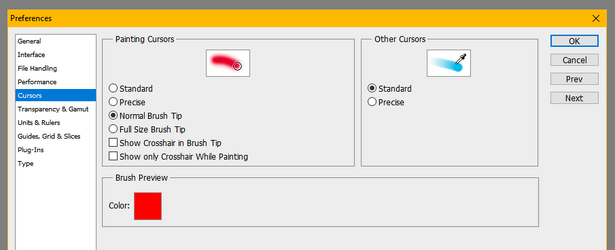
  • The other setting resides in Edit>Preferences>Cursors. On the right, where it says "Other Cursors", make sure that you are using "Standard" rather than "Precise". The Precise setting affects more than just the Lasso tools, which you don't mention, but this easy fix is at least worth a try.

If neither of these suggestions works, then I am unfortunately out of ideas.


1760901029275.png
 
I looked at my key board and the cursors like you suggested and they're no helped so I'm afraid that you're right about WD11. Everything in the tool bar works fine except the lassos though. Thanks for trying to help me
 

Back
Top