
Hi,
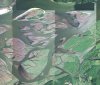
I have a mosaic of air photos from the Columbia River in Oregon. The photos are collected in a series of north-south strips and then stitched together (from the government). In the north-south direction the photos blend together well. However, each strip has a pronounced change from east to west so that at the edge of the strips there is a very prominent line.
I would be appreciative of any advice on how to clean up these images so that the banding is removed/minmized.
Thanks,
Chris.
I have a mosaic of air photos from the Columbia River in Oregon. The photos are collected in a series of north-south strips and then stitched together (from the government). In the north-south direction the photos blend together well. However, each strip has a pronounced change from east to west so that at the edge of the strips there is a very prominent line.
I would be appreciative of any advice on how to clean up these images so that the banding is removed/minmized.
Thanks,
Chris.
