
What's new
Photoshop Gurus Forum

Welcome to Photoshop Gurus forum. Register a free account today to become a member! It's completely free. Once signed in, you'll enjoy an ad-free experience and be able to participate on this site by adding your own topics and posts, as well as connect with other members through your own private inbox!

Bevel and Emboss texture, not the entire image


H8Cr1me

Member
Messages
5
Likes
0
I am trying to create a tiling stucco texture by assigning a texture in the Bevel and Emboss section, of the photoshop layer style. I am getting the desired texture effect but it is applying the emboss to the edges of the image so when I tile it you see the edges. Does anyone know how to make it stop doing this?
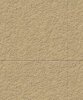
emboss_edge.JPG
 
Try creating a new blank layer above your pattern and merge it with the layer with the effects on.

then go to filter> other > offset and offset it slightly then define your patter from that.
 
That didn't do anything. I know that I could merge the effects to the layer, offset, and then use the clone tool to fix the edges but I want to be able to save this as a PSD where I just have to come in and change the color and save a new jpg. I'm thinking there has to be a way to tell it not to apply the emboss to the image.
 
I take it there is no switch I can flip or knob I can turn to tell it not to apply to the edges of the image?
 
You could just save it as a large PSD and then use it to order.

Other options could be create a new layer underneath fill it with the colour you want and then set the textured layer to multiply that may work.

Or same again but transform the texture layer so it doesnt quite go to the edges and merge the layers.
 
Wait a minute.... YOU APPLIED THE EMBOSS filter... That's the way PS will be do it. You should apply (rasterize) the effect on the layer and crop out any border left by PS.
 
or in the layers panel where it says fx on the effected layer right click the fx part and you should get an option to scale effect.
 
I guess I'll just open and crop the saved jpg a few pixels after i save it from the psd. Thanks for the help guys.
 
I just moved the Size slider, in the Structure section, of the Bevel and Emboss all the way as far as it would go and that did what I wanted. Thanks for the help yall
 

Back
Top