What's new
Photoshop Gurus Forum

Welcome to Photoshop Gurus forum. Register a free account today to become a member! It's completely free. Once signed in, you'll enjoy an ad-free experience and be able to participate on this site by adding your own topics and posts, as well as connect with other members through your own private inbox!

Brush strokes are full of circles


itifi

New Member
Messages
4
Likes
0
Hi guys!
I have a question regarding photoshop brush tool. Whenever I try to draw a line with my brushes they are just full of circles and not smooth at all and I don't know how to fix it. I'm attaching a link to a photo of a few brush strokes so you can see what I mean: imgur*com/RVonDbp (replace the * with a dot)
This happens if I use my mouse or my wacom pen&touch tablet so I think the problem is in Photoshop.
Any help would be much appreciated!
 
IMHO, the most likely cause is that you are using a brush with a doughnut like shape. Instead, replace it with a brush that has a solid, filled-in center, and the problem should go away.

Tom
 
Hi itifi,

First off, you can post images here. Just use the "insert image" icon located at the top, right end of the of the reply window.
ImageUploadIcon.jpg

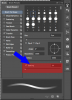
Secondly, go to WINDOW > BRUSH, click to open your Brush Panel. Under the Brush tab, highlight Brush Tip Shape, move the Spacing slider all the way to the left ( 1% ).

This will stop the problem your having.

Screen Shot 2013-12-20 at 8.49.29 PM.png
 
Last edited:
Hi itifi,

First off, you can post images here. Just use the "insert image" icon located at the top, right end of the of the reply window.
View attachment 40431

Secondly, go to WINDOW > BRUSH, click to open your Brush Panel. Under the Brush tab, highlight Brush Tip Shape, move the Spacing slider all the way to the left ( 1% ).

This will stop the problem your having.

View attachment 40433

Thanks man, that did it for me! I wanted to attach the picture but apparently the forum only allows attachments after 5 posts. Thanks for the help!
 

Back
Top