
Hi everyone,
I was hoping that there is someone on this forum who is willing to help me photoshop this photo by [FONT=Helvetica Neue, Arial, sans-serif]Franck Gelabert and make just the grey background lighter (not the model), and hopefully be able to make the grey background 1 tone as much as possible. Doesn't have to be completely 1 toned, but I find that there are too many tones of grey in the photo (i.e. the corners are a lot darker which I am not loving).
[/FONT]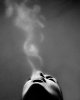 [FONT=Helvetica Neue, Arial, sans-serif]
I saw a video on YouTube of the same photo printed onto a hotel room wall. It looks as though the photo was photoshopped to have a lighter background as well. I'm looking to achieve results just like this photo!
[/FONT]
I tried adjusting the brightness and contrast but it didn't turn out that great since I want the model to remain the same. I am looking to get this photo professional printed and enlarged to fit on my wall.
Thank you so much !
I was hoping that there is someone on this forum who is willing to help me photoshop this photo by [FONT=Helvetica Neue, Arial, sans-serif]Franck Gelabert and make just the grey background lighter (not the model), and hopefully be able to make the grey background 1 tone as much as possible. Doesn't have to be completely 1 toned, but I find that there are too many tones of grey in the photo (i.e. the corners are a lot darker which I am not loving).
[/FONT]
[FONT=Helvetica Neue, Arial, sans-serif]I saw a video on YouTube of the same photo printed onto a hotel room wall. It looks as though the photo was photoshopped to have a lighter background as well. I'm looking to achieve results just like this photo!
[/FONT]
I tried adjusting the brightness and contrast but it didn't turn out that great since I want the model to remain the same. I am looking to get this photo professional printed and enlarged to fit on my wall.
Thank you so much !


