What's new
Photoshop Gurus Forum

Welcome to Photoshop Gurus forum. Register a free account today to become a member! It's completely free. Once signed in, you'll enjoy an ad-free experience and be able to participate on this site by adding your own topics and posts, as well as connect with other members through your own private inbox!

Circle with dropshadow


ElJuanJo

Member
Messages
9
Likes
0
Greetings,

This is an image of a cover photo style I am trying to copy. I'm having trouble making the circle with the drop shadow effect that is being shown by the red arrows.

View attachment 36187

So far i've made this background photo, but when I draw a circle on the green part it gets pixelated.

Untitled-11.jpg

Could you please help me created the circle with the drop shadow effect?

 
Greetings,

This is an image of a cover photo style I am trying to copy. I'm having trouble making the circle with the drop shadow effect that is being shown by the red arrows.

Capture.PNG

So far i've made this background photo, but when I draw a circle on the green part it gets pixelated.

View attachment 36188

Could you please help me created the circle with the drop shadow effect?
 
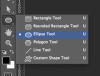
ElJuanJo, make your circle with the Ellipse Tool....

ShapeTools_EllipseTool.png

....and NOT the Elliptical Marquis Tool, it will scale better without pixelating.

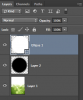
You can then add a drop shadow via the layer styles or you can use the Elliptical Marquis Tool to make the drop shadow manually on it's own layer below the white circle and above your background layer. Just create a larger circle than your white one, fill with black, blur it, position it, and then reduce it's opacity.

circle_01.png

Screen Shot 2013-08-23 at 11.43.42 PM.png
 

Back
Top