
What's new
Photoshop Gurus Forum

Welcome to Photoshop Gurus forum. Register a free account today to become a member! It's completely free. Once signed in, you'll enjoy an ad-free experience and be able to participate on this site by adding your own topics and posts, as well as connect with other members through your own private inbox!

Could someone point me in the direction of a tutorial....


Status
Not open for further replies.

Spytim

New Member
Messages
3
Likes
0
.... that would help achieve this, almost cartoonized effect that you see in a lot of glossy posters:

Hmm I just got a message stating that I need to have made 4 posts before I can post a link...
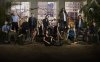
Season-5-Promo-Shot-HD-3000x1876-lost-2973752-2560-1601.jpg

I wouldn't consider myself to be a photoshop novice so advanced tutorials are fine. Or if its relatively easy to just explain I would be really grateful.

Thanks a Lot :)
 
Achieve the effect to what (image)?
Can you post the image that you are trying to implement the "Effect" on?


What I notice about the picture, which is obvious, is that the actors/ people were cut out from another image (greenscreen or something) and added into an edited scene. Of course, they were not actually there but what I mean is the background is heavily modified and the actors are just pasted into it with some scene lighting applied to them. Doesn't seem too difficult to achieve.
 
Hi, first off, why did you put "effect" in quotes like that? I can almost see you doing air quotes with your fingers as if I've said something wrong by using the word.

the ... "effect" ... I'm talking about is how all the actors look like waxworks. Super fake, plastic cartoons.
 
Thanks hoogleman. Any idea which one? I got simplify and adjust and i couldn't even get anything close.
 
The trick is how you blend it sometimes it is duplicated image filter applied to top copy and set to overlay soft light etc and the opacity reduced I would start of with adjust maybe then another copy blended in with simplify or clean. Never actually explored the filters for this effect as it has never suited any of my images but I am guessing the higher quality the image the better the outcome.
 
Don't look fake to me. Very good, qualitative studio shot (and Lost could afford it) plus (like man said) lights and shadows and some color toning.
 
Status
Not open for further replies.

Back
Top