
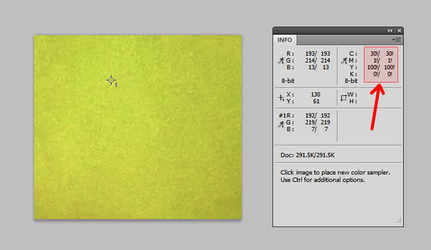
I'm using Photoshop CS5. When I activate the Info panel and hover over a spot on this green swatch, the section of the Info panel that displays CMYK values is showing those values with an exclamation point after them. Normally, CMYK values are indicated as percentages and display a percentage symbol (%). Does anybody know what an exclamation point is supposed to mean here? I tried looking it up but couldn't find anything.
Just for fun, I tried desaturating the image a little, which did turn the exclamation points back to percentage symbols. I'm wondering if the exclamation points are somehow trying to say that the image is over-saturated?
Thanks,
Rich
Just for fun, I tried desaturating the image a little, which did turn the exclamation points back to percentage symbols. I'm wondering if the exclamation points are somehow trying to say that the image is over-saturated?
Thanks,
Rich
