Hi All,
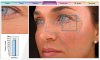
I would love some help exploring a Photoshop solution for a problem my company has run into. We are a skincare spa, specializing in facials and anti-aging treatments. In the past, we have used a software system to analyze our clients’ skin, quantifying and highlighting wrinkles, pore count, etc. (see image). We have hardware to go with it that provides a chin and forehead rest and consistent lighting while the image is taken.
Unfortunately we’ve run into difficulties with our software vendor. To continue service with them at greater capacity, we would have to pay literally tens of thousands of dollars – something we cannot afford. So, we’re exploring other options to try to continue providing this service to our clients.
I am a novice Photoshop user and thought there might be a way to at least highlight or visually mark a couple elements (wrinkles and pore count) we are looking for. After a brief search I haven’t found anything (CS5), but was hoping someone with more experience would be able to tell me definitively. Any suggestions for other programs that might have what we are looking for are welcome.
Thanks very much!
I would love some help exploring a Photoshop solution for a problem my company has run into. We are a skincare spa, specializing in facials and anti-aging treatments. In the past, we have used a software system to analyze our clients’ skin, quantifying and highlighting wrinkles, pore count, etc. (see image). We have hardware to go with it that provides a chin and forehead rest and consistent lighting while the image is taken.
Unfortunately we’ve run into difficulties with our software vendor. To continue service with them at greater capacity, we would have to pay literally tens of thousands of dollars – something we cannot afford. So, we’re exploring other options to try to continue providing this service to our clients.
I am a novice Photoshop user and thought there might be a way to at least highlight or visually mark a couple elements (wrinkles and pore count) we are looking for. After a brief search I haven’t found anything (CS5), but was hoping someone with more experience would be able to tell me definitively. Any suggestions for other programs that might have what we are looking for are welcome.
Thanks very much!