What's new
Photoshop Gurus Forum

Welcome to Photoshop Gurus forum. Register a free account today to become a member! It's completely free. Once signed in, you'll enjoy an ad-free experience and be able to participate on this site by adding your own topics and posts, as well as connect with other members through your own private inbox!

exposure problem help needed


Dragon

New Member
Messages
3
Likes
0
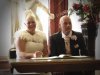
Hi everyone I need some help with an exposure problem .I want to darken the background behind the Bride in this photo and over the grooms right shoulder I am fairly new to using PS CS5 .Also any comments on other ways to improve gratefully recieved .I was thinking about B+W with a sepia toning and softening a bit any thoughts.
Thankyou
MickRegistrar 1.jpg
 
To begin with, you have a couple problems to deal with. The toughest one is that the bride, her skin, her hair, her dress, the wall and the white chocolate statue all blend together. If you make a levels adjustment first, that will help because you will have to make a selection of the wall, the window, and the statue behind the bride. How you make the selection -- how well you make the selection -- is vital to the results. Changing the color, darkness, etc., not so hard. I would recommentd selecting the wall not just over the groom's shoulder, but the entire wall.

Depending on how particular you need to be, the feathers and hair fringe will be difficult to work with, but not impossible. Personally, if there is no objection from the bride (or any vested interest :} ), I would remove the statue altogether. The only careful part with that is to clone the drape over its hand, careful work but not hard. Of course, if you change the color of the wall, etc., the statue will at least not look like it's growing out of the bride's body.

Backlit photos like this are difficult to fix. It's not a simple exposure problem; it's two entirely and widely different exposures.

Once you make a decent selection, and it will probably require use of more than one tool, personally I would immediately save it: select>save selection. You can then duplicate this so that you work with it separately or use adjustment layers over the selected area. Now you can do an exposure, curves, or levels adjustment. Then you could use a color blend mode layer to adjust the color of the wall, etc. With the selection active (you may need to refine edge and/or feather the selection for it not to look cut out), create new layer, fill with the desired color and play with the opacity and blend modes: color, soft light, hard light, etc. Depends on the mix of colors from one layer to the other.

Anyway, in PS there are many ways to go about doing the same thing. I think this is pretty direct but others may have different ideas that would work better for you. I hope this was helpful and I do hope you get it done to your satisfaction. Please keep us up to date with your changes and the result. Thanks.

 
Last edited:
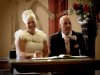
This is an idea of what you want I think. I did not do the selection around the bride as carefully as needs to be done and the drape fix was a quick one. And the backlighting on the bride should be adjusted. It does weird things to her hair and gown. This copy is smaller than your original.

Registrar 1.jpg
 
its pretty hard to make it look natural because there is not detail in those areas.
so all you can do is darken/change color of that area.
if you had another image of the same room without the glare then something could be done
 
It does look more natural Stric9. I hadn't finished with the above imgae as far as feathering out the mask I made so her hair and feathers look better and maybe remove some of the height (of the hairdo) which is too high contrast/really looks unnatural. But there is no good solution since the higlights are so "blown out."
 
Many thanks to all who replied .I think I might go down the road Dataflow suggested and try to get a second photo of the room without the glare. Not sure when I'll get there but theres no rush as its only a private project for a friend with no time retraint.Once again thankyou all.
Mick
 
You're welcome. I agree of course that starting with a better photo is a good idea, but some salvaging can be done. If you ever find yourself taking pics in this kind of lighting again, do all you can to get rid of back lighting, close drapes, etc. Good luck with whatever solution you decide on!
 

Back
Top