What's new
Photoshop Gurus Forum

Welcome to Photoshop Gurus forum. Register a free account today to become a member! It's completely free. Once signed in, you'll enjoy an ad-free experience and be able to participate on this site by adding your own topics and posts, as well as connect with other members through your own private inbox!

Specific Half tone help


Jfiocca

Member
Messages
5
Likes
0
I’m trying to design a hockey jersey where part of the jersey design is a simple solid color of that curves up and around the top. The lower half below the curve is a different color. I’m trying to create a gradient half tone from the solid color of top following the curve and fading to the bottom. I can’t figure that out.
 

Attachments
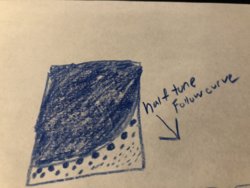
  • 63355603-EAAD-4F27-AC73-DE2133E263DE.jpeg
    63355603-EAAD-4F27-AC73-DE2133E263DE.jpeg
    2.5 MB · Views: 5
Last edited:
Hello and welcome to PSG.

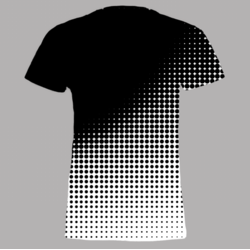
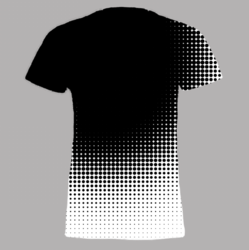
Are you asking about something like this?
Screen Shot 2017-12-11 at 4.41.30 PM.png
 
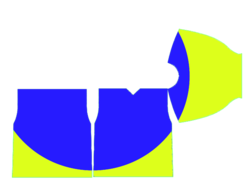
Wow, that's great! I'm looking for the gradient/half tone to follow the curve. Here's a more specific example. Note, it's as if there is a gradient circle originating from the center of the art. The gradient continues on the the sleeve. The gradient follows the radius of the circle. What you have up there is actually almost perfect! As I think about it, maybe it's not possible for the half-tone to follow the arc. The spacing of the dots would be greater as it gets farther away?? Maybe the gradient as you show above straight down, but the sleeve is out to the side? Make sense? I can't believe I just now found this resource! Amazing
 

Attachments

  • gradient2.png
    gradient2.png
    429.1 KB · Views: 3
  • Gradient.png
    Gradient.png
    240.3 KB · Views: 3
OK, I see now what your looking for. Give me awhile, I think I can come up with something.............it just may have to be a Ps cheat. This may be a job for Ai.
 
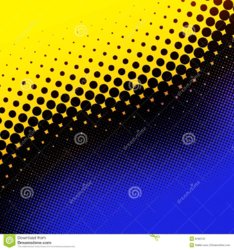
Great. Thank you! I have a great example of what I'd like to see applied at the transition. See this attached "royalty free" image as an example. This is really what I think would look just perfect.
 

Attachments

  • yellow-blue-halftone-6766747 (1).jpg
    yellow-blue-halftone-6766747 (1).jpg
    257.7 KB · Views: 3
I see. That example uses a straight halftone pattern like my example............it's not a circular halftone like you described in post #3.

Here's another example.....remember, it's just one color.
Screen Shot 2017-12-11 at 7.30.07 PM.png
 
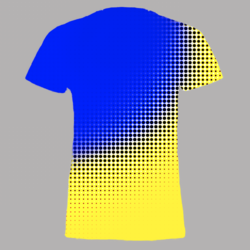
That looks awesome! I love it! I'm thinking the "black" or blue dots wouldn't actually go all the way to the bottom. The "white" section would follow the curve as well. I think I would like it with the blue on top (black in the middle) and yellow on bottom. Can you help mock up that gradient.png with your half-tone? I can't thank you enough. I'm trying to put together a jersey concept for a youth hockey team, and this is very helpful!
 

Attachments

  • depositphotos_2862404-stock-illustration-abstract-halftone-background.jpg
    depositphotos_2862404-stock-illustration-abstract-halftone-background.jpg
    75 KB · Views: 1
For now, this is about as close as I can get you. I will see what else I can come up with. Maybe someone else will jump in as well.

But for a concept image, this might get the job done.
Screen Shot 2017-12-11 at 7.48.45 PM.png
Screen Shot 2017-12-11 at 8.00.49 PM.png
 
Last edited:
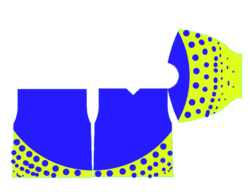
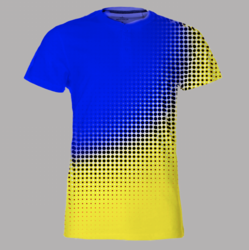
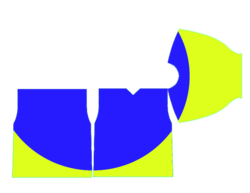
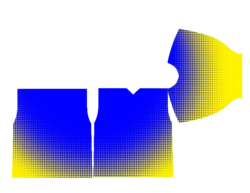
You've done so much, and I don't want to seem greedy, but could you please apply that on this base art? I am pretty confident that will do the trick! If not, no worries... I can probably include yours in addition to mine to the jersey creators, but I think if my template had your half-tone gradient included, I would be set!!
 

Attachments

  • Gradient.png
    Gradient.png
    240.3 KB · Views: 2
Sorry, got called away.

The gradient png just doesn't translate as well.
 

Attachments

  • HalftoneJersy_02.png
    HalftoneJersy_02.png
    3.4 MB · Views: 2

Back
Top