What's new
Photoshop Gurus Forum

Welcome to Photoshop Gurus forum. Register a free account today to become a member! It's completely free. Once signed in, you'll enjoy an ad-free experience and be able to participate on this site by adding your own topics and posts, as well as connect with other members through your own private inbox!

Help cutting out image from photo


Jim Mantione

New Member
Messages
1
Likes
0
Can someone tell me how this is possible to cut out the photo from the background and replace the background with black. I need to show all my work on my site but would like a consistant background. Im having trouble working my way around the wires in the photos

flag resize.jpg
 
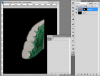
Use the pen tool to make a selection then darken the background. I wouldn't recommend completely black as you will loose the shadow which might make the whole image look strange.
 
Here's a partial pen tool of the outside of the wire. It's not real fast but it's precise. I started by including the shadow but you'll have to recreate that if you need it I think. Artistic choice I suppose.

wire.PNG
 
I have a question that goes along with this thread.
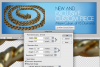
I cut something out using the pen tool, inversed the selection, then dragged it into another photoshop window, onto a different background. However, it looks blurry now. What did I do wrong? What do I need to do?Picture 8.png
 
Last edited:
Actually, it gets blurry when I change the size in the new document. The new document is smaller and is set for the web. I am copying and pasting. Also tried just dragging the photo over.

I am doing this for someone and they told me they were unhappy because the chain was blurry. So I'm trying to fix it but... it seems like because it has to be made smaller and set to go on web, there is nothing I can do about it. Is this correct?
 
If you cannot increase the amount of pixels in this new document it won't get any sharper. Less pixels = less quality. What are the dimension of this new document because it might be possible that the dpi might be too low.
 
Ah I see what your trying to do. Instead of creating a brand new document with the Web dimensions, use the high res document and do File - Save save to Web. That way you can customise your output size to whatever you like. It shouldn't cause issues that way.
 

Back
Top