
What's new
Photoshop Gurus Forum

Welcome to Photoshop Gurus forum. Register a free account today to become a member! It's completely free. Once signed in, you'll enjoy an ad-free experience and be able to participate on this site by adding your own topics and posts, as well as connect with other members through your own private inbox!

Help me reproduce this


crub

New Member
Messages
2
Likes
0
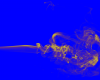
3d.png

This is a simple combination of a yellow layer upon another layer with smoke but the result is a maaaaad 3d effect.

I'm looking to reproduce this effect, but don't know what the key factor are to do that. is it a one time effect because the smoke picture... I want to achieve this result on a white backround, would be great if someone has tips, direction or idea. Condescending comments of course are more than welcome, we are on a forum after all.
 
Thats a smoke brush used on blue layer.
Find some smoke brush on net.
1. Make blue background.
2. Make new transparent layer.
3. Press D or make foreground color black.
4. Take smoke brush and paint it on transparent layer.
5. Holding CTRL click on transparent layer.
6. Now make new Adjusment layer/Solid Color with yellow.

Should be close. Maybe need to play with layer blending modes on that solid color.

To white use similiar method and experiment.
 
Can you make me one of those smoke bomb ****?

LOL

Text:Rambo :D Thanks, Replay back..
 
Last edited by a moderator:

Back
Top