
Hello everyone,
my first post here. I am working with PS4 and I have at least some knowledge on how to use it, but I'm not an expert by any means. So maybe someone with more expertise can help me out?
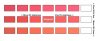
In order to match the color of a real life object, I would like to create a chip chart with variations of the original color so that I can print it and pick a variation that is closest to the object. (See image)
Starting with a color in the center, the chips to the left should have -5% brightness and the ones to the right +5% in incremental steps.
The chips above and below should be +10 and -10 in HUE from the center row.
Is there an easy way to do this, maybe via Action or Scripting? Just printing the Variations window is unfortunately way too crude to get a good match.
Any help would be appreciated, since doing this by hand is quite tedious.
Thanks!
my first post here. I am working with PS4 and I have at least some knowledge on how to use it, but I'm not an expert by any means. So maybe someone with more expertise can help me out?
In order to match the color of a real life object, I would like to create a chip chart with variations of the original color so that I can print it and pick a variation that is closest to the object. (See image)
Starting with a color in the center, the chips to the left should have -5% brightness and the ones to the right +5% in incremental steps.
The chips above and below should be +10 and -10 in HUE from the center row.
Is there an easy way to do this, maybe via Action or Scripting? Just printing the Variations window is unfortunately way too crude to get a good match.
Any help would be appreciated, since doing this by hand is quite tedious.
Thanks!
