
Hi all, I joined this forum specifically to ask this question...
How do I create a color palette with more than 256 colors?
I have a very specific color palette I would like to use, which is shown in the picture...
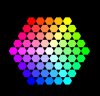
It is the color palette used in the Playstation 3 title, 'Little Big Planet 2'. From the outside, travelling inwards, the saturation decreases by 25. So The Hue & Saturation values are set in stone, but the Brightness can be adjusted to the 2nd nearest value, eg. 0,2,4,6......98,100.
By my count, the image above has 61 colors. So 61 multiplied by 50 (brightness levels) = 3050 colors.
Basically, I'd like a way to convert any image I have, to use this specific color palette of 3000+ colors, in the same way I can with the index-color / palette load/ save etc. if that makes sense?:neutral:
I have zero scripting experience, which is what I fear I may need to do, but any help is greatly appreiciated!
Thanks,
Jamie
How do I create a color palette with more than 256 colors?
I have a very specific color palette I would like to use, which is shown in the picture...
It is the color palette used in the Playstation 3 title, 'Little Big Planet 2'. From the outside, travelling inwards, the saturation decreases by 25. So The Hue & Saturation values are set in stone, but the Brightness can be adjusted to the 2nd nearest value, eg. 0,2,4,6......98,100.
By my count, the image above has 61 colors. So 61 multiplied by 50 (brightness levels) = 3050 colors.
Basically, I'd like a way to convert any image I have, to use this specific color palette of 3000+ colors, in the same way I can with the index-color / palette load/ save etc. if that makes sense?:neutral:
I have zero scripting experience, which is what I fear I may need to do, but any help is greatly appreiciated!
Thanks,
Jamie