
Photoshop Gurus Forum
Welcome to Photoshop Gurus forum. Register a free account today to become a member! It's completely free. Once signed in, you'll enjoy an ad-free experience and be able to participate on this site by adding your own topics and posts, as well as connect with other members through your own private inbox!
You are using an out of date browser. It may not display this or other websites correctly.
You should upgrade or use an alternative browser.
You should upgrade or use an alternative browser.
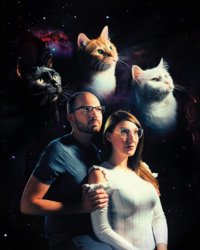
How to do this effect?
- Thread starter danman03
- Start date

- Messages
- 24,122
- Likes
- 13,708
The human subjects and the cats were all photographed in the same lighting, then isolated from their original backgrounds and added to a space themed background using layers, possibly blending modes, and layer masks.
Since there were several different techniques used, you may have to be more specific.
Since there were several different techniques used, you may have to be more specific.
- Messages
- 24,122
- Likes
- 13,708
Not sure what adjustments have been made to the skin. It looks fairly straight forward to me and not really painted.The skin is soft and smooth like it's been painted.
Ok, I will assume that you already know how to separate subjects from their backgrounds.
Here I have a cat photo in which I used an alpha channel technique to convert to black and white. This is one of the best techniques to use in animals with fur.
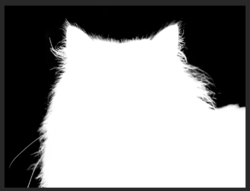
Once I had the alpha channel, I converted that into a selection.....
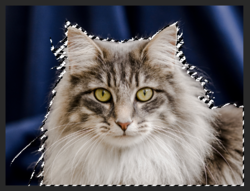
.......and then the selection into a layer mask on the cat image layer.
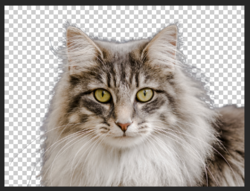
I then moved the cat image over to the space scene using the Move Tooll and draggig to the space scenes tab.
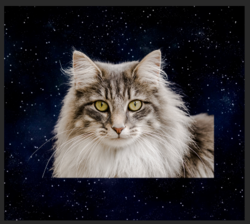
I applied a layer mask to the cat image layer and used the Brush Tool to blend the edges.
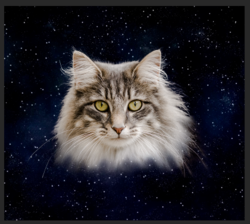
That's it! Same technique for the human subjects.
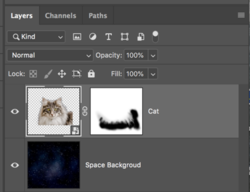
I’m sorry, I should have been clearer. I know how to separate objects from their backgrounds and I know how to isolate the cats. I’m wanting to know how to get the colors to pop and the skin to look smooth and painted like that, as well as getting that retro effect.Not sure what adjustments have been made to the skin. It looks fairly straight forward to me and not really painted.
Ok, I will assume that you already know how to separate subjects from their backgrounds.
Here I have a cat photo in which I used an alpha channel technique to convert to black and white. This is one of the best techniques to use in animals with fur.
View attachment 108116
Once I had the alpha channel, I converted that into a selection.....
View attachment 108115
.......and then the selection into a layer mask on the cat image layer.
View attachment 108117
I then moved the cat image over to the space scene using the Move Tooll and draggig to the space scenes tab.
View attachment 108118
I applied a layer mask to the cat image layer and used the Brush Tool to blend the edges.
View attachment 108119
That's it! Same technique for the human subjects.
View attachment 108120
I didn’t mean to make you do all that work.
- Messages
- 24,122
- Likes
- 13,708
Not a problem. You asked about the layer masking so I assumed you wanted help with that.I didn’t mean to make you do all that work.
I apologize, but I don't see effects on the skin. I also don't see a retro type effect. For me it's just minor color and lighting adjustments. There may be some slight softening, but even that's limited. All of these adjustments can be made in camera raw. Again sorry, maybe someone else can offer some help there.I’m wanting to know how to get the colors to pop and the skin to look smooth and painted like that, as well as getting that retro effect.

chrisdesign
Guru
- Messages
- 4,269
- Likes
- 6,330
I got the impression that the original photos are taken under studio conditions.
The strong main light from a soft box comes from the top/right, and there is a back rim light from the left.
A set like this can create a an effect of a relative harsh light but with a soft transition into the shadows.
The result after good photoshopping is this dreamy effect that you call retro or painting.
I fully agree with Sam's comment. I can't detect any use of filters.
It's just one of these perfect works with a very personal look of a talented artist.
The strong main light from a soft box comes from the top/right, and there is a back rim light from the left.
A set like this can create a an effect of a relative harsh light but with a soft transition into the shadows.
The result after good photoshopping is this dreamy effect that you call retro or painting.
I fully agree with Sam's comment. I can't detect any use of filters.
It's just one of these perfect works with a very personal look of a talented artist.