blasteralfred
Active Member
- Messages
- 38
- Likes
- 4
Hi,
Whenever my photos get some pimples, blemishes or dark spots, I prefers healing brush and spot healing brush. Sometimes blurs, and patches, and sometimes, Copy+Paste+Levels . But these all works in the case of small spots / markings. In the case of comparatively larger spots such as tattoos, wounds, paintings etc, what will be the most appropriate methodology?
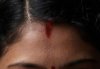
I am attaching a sample image, in which there is a red marking on forehead, and I want to remove it, while preserving the natural look. How can I do this?
Whenever my photos get some pimples, blemishes or dark spots, I prefers healing brush and spot healing brush. Sometimes blurs, and patches, and sometimes, Copy+Paste+Levels
. But these all works in the case of small spots / markings. In the case of comparatively larger spots such as tattoos, wounds, paintings etc, what will be the most appropriate methodology?I am attaching a sample image, in which there is a red marking on forehead, and I want to remove it, while preserving the natural look. How can I do this?
Attachments
Last edited: