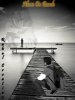
Hi Rock, welcome to the world of Photoshop compositing. Fun to make wasn't it? Here's my 2 cents (or 6?):
First a question. Why did you take a high resolution image and make it one of poor quality? It would be better to either find an image of greater size or quality for your setting/background or transform that BG to meet the size of your own photo -- or at least to have to shrink him down less.
In this low res form, the setting -- even in its most forward position under the feet of the subject -- is very blurry. So like dv8 suggested you can blur the subject to fit in, or you can sharpen the BG, even if you select the front most area and sharpen it (there are various ways to blend it in). But I still think the main problem here results from shrinking the resolution.
Another thing: your subject is not grounded. you need to play with creating shadows underneath him. Sometimes you can get the effect you want from layer effects and a high setting on distance, but more likely you just need to create a layer directly below and paint in some shadows. Speaking of shadows, why is the photographer's shadow in the picture and how did it move to his other side?
Finally, regarding your text. The heading, "Alone on Beach" gets lost because it is so small. It touches the top of the document and it really needs white space above it. Don't worry about it ending in front of you little vignette in the sky or make the vignette smaller. Also I think the Rahul Creation is too large and awkwardly placed. I suggest you make it smaller, place it to the subject's back and keep it confined to the triangle bounded by the water's horizon.
Whew, that's a lot of comments. I know it seems really critical, but that's how I learned to make better composition and you don't have to agree with everything I say anyway! :mrgreen: Just trying to help. Keep it up. Good first attempt, really.